swaptop: who is eating your swap?
A htop-style monitor for swap. free tells you 11 GB of swap is in use. top won't tell you whose it is. swaptop lists every process by how much of it is swapped out, tells you whether that swap is really out on the disk or only reserved, and lets you do something about it: pull a process back into RAM, push an idle one out, or empty the swap device completely.
- Go
- Terminal UI
- Linux
- Open source
Role:
Sole designer & engineer
Stack:
Go, tcell, one static binary
Status:
v1.0.1, GPLv3, on Homebrew, apt and dnf
Install
With Homebrew on Linux, it is one line:
brew install andydixon/tap/swaptopThat builds it from source, puts swaptop on your path and installs the manual page, so man swaptop works straight away. brew upgrade picks up new releases.
Then run it as root, so it can see and act on every process:
sudo swaptop              # everything
swaptop                   # your own processes only
swaptop -t -d 1           # tree view, refresh every second
swaptop -s DELTA          # sort by who is swapping right now
From my package repository
On Debian, Ubuntu, Fedora, RHEL, openSUSE or Arch, add repo.dixon.cx once and install swaptop with apt, dnf, zypper or pacman. It's signed, and updates arrive with the rest of your system.
# Debian, Ubuntu
sudo apt install swaptop

# Fedora, RHEL, AlmaLinux, Rocky
sudo dnf install swaptop
Packages are built for x86-64, ARM64, ARMv7, 32-bit x86 and RISC-V.
From source
go install github.com/andydixon/swaptop@latestswaptop needs Linux, because it reads /proc. The page-out action needs kernel 5.10 or later; everything else works on older kernels.
The itch
A server starts getting slow, free -h says swap is 70% full, and you want to know why. The usual answers are a loop that reads VmSwap out of every /proc/PID/status, or a one-liner you search for every time. Both give you a list of numbers. Neither tells you whether the swap is a problem, which part of the process is in it, or what you can do about it without rebooting.
There are three questions hiding in there: how much swap is really in use, which processes own it, and how much of it is actually out on the disk. I wanted all three on one screen, laid out like htop, so there is nothing new to learn.
Reserved or really swapped out?
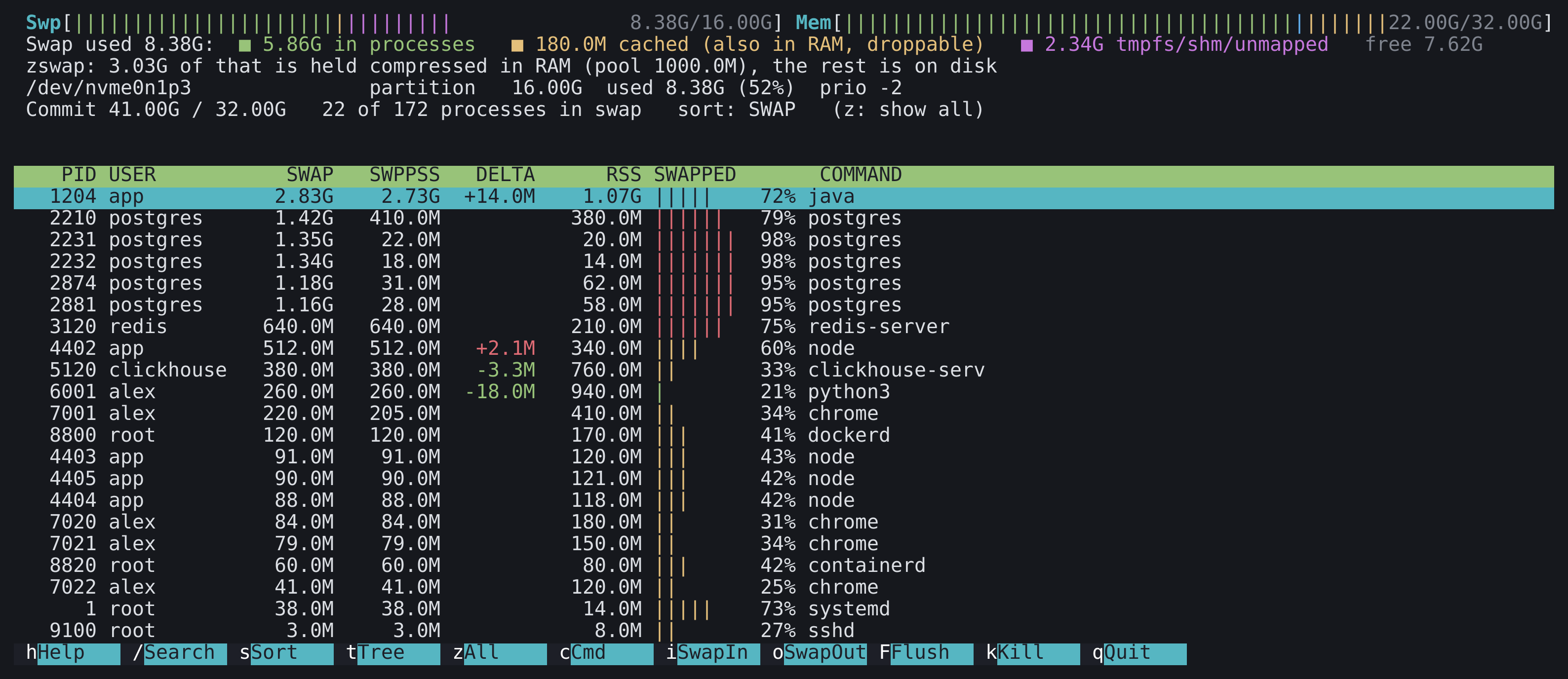
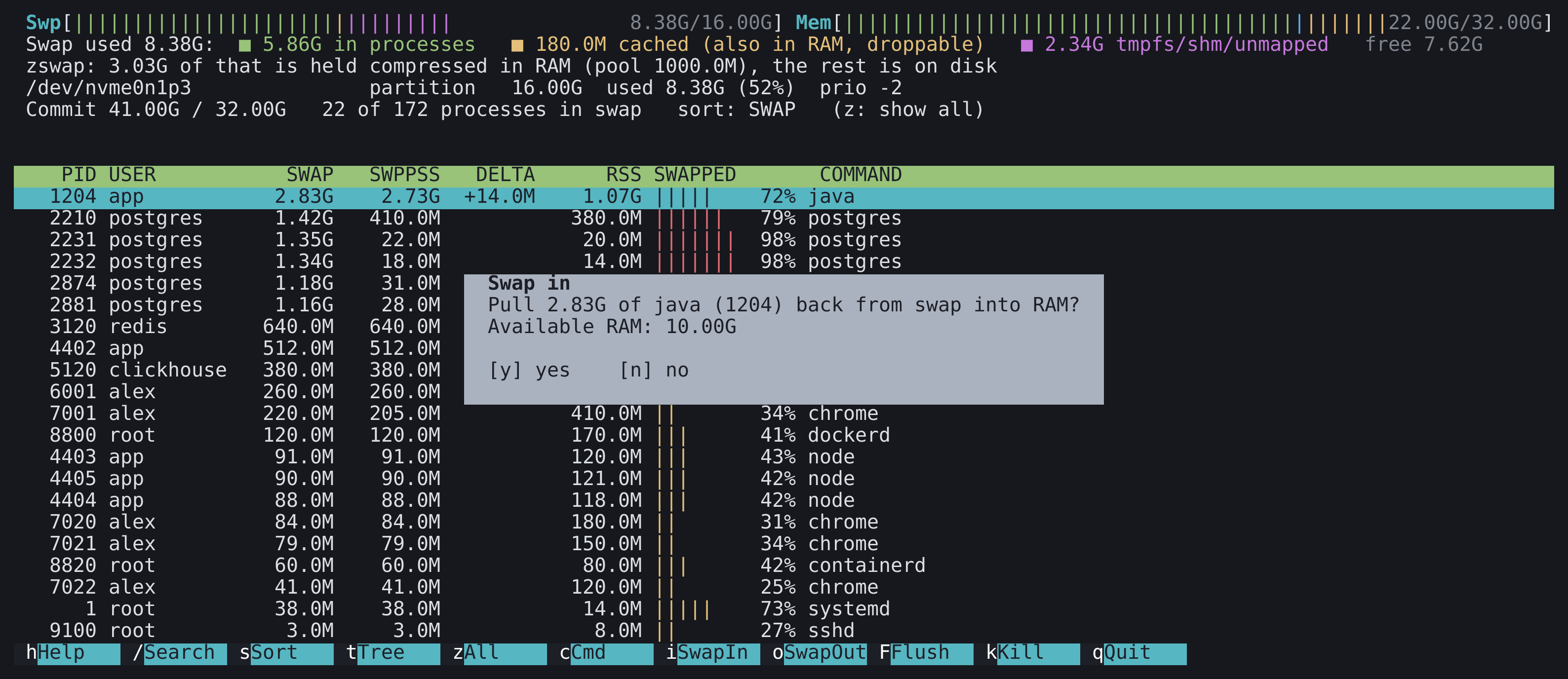
The bar at the top splits swap in use by what kind it is. Green is memory that belongs to processes. Yellow is swap cache: pages that have been read back into RAM but still hold a swap slot, so the kernel need not write them out again. That is swap which is reserved rather than swapped out, and it is dropped instantly when the device fills. Magenta is swap that belongs to no process, mostly tmpfs and shared memory files.
That is why a process can show nothing in swap while the device's usage barely moves. If the zswap compressed cache is on, a line says how much of the swap is held compressed in RAM, rather than on the disk at all. zram devices show their compression ratio.
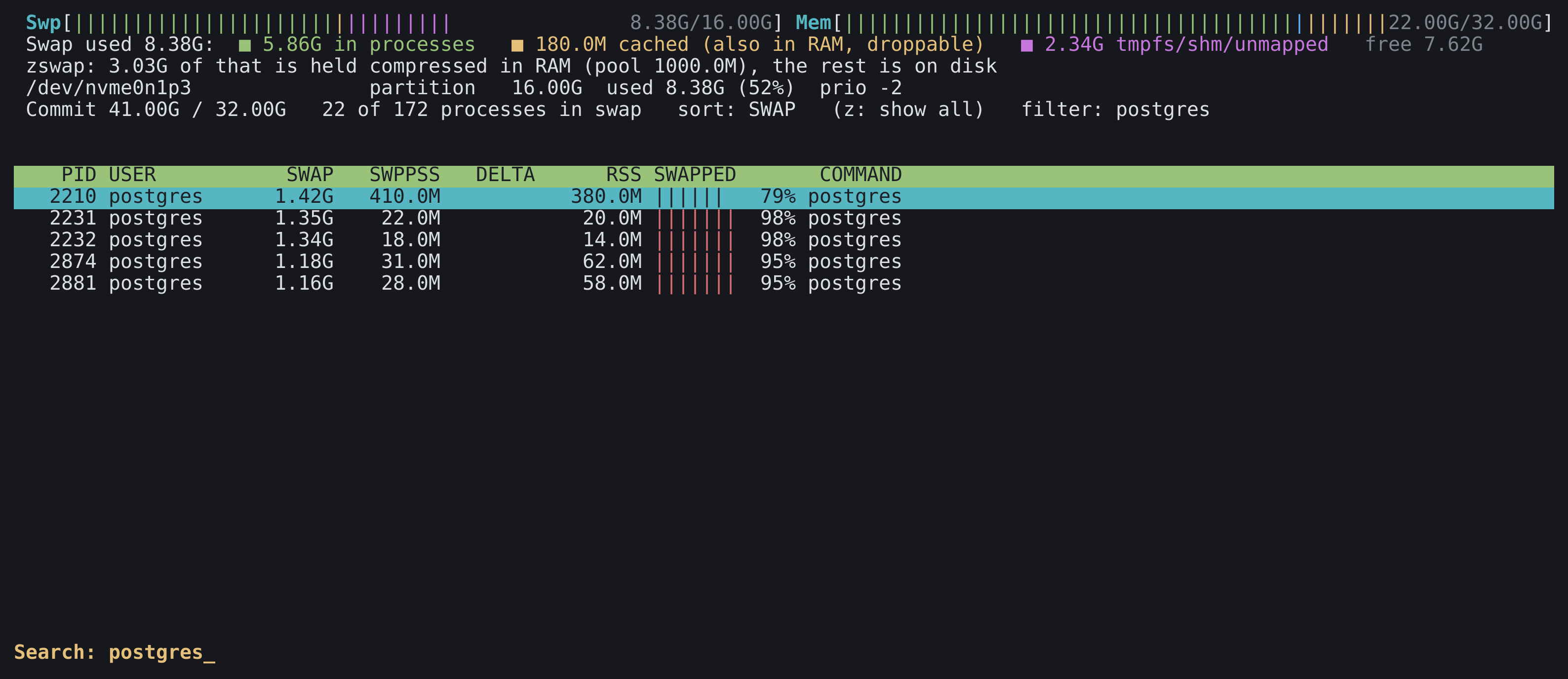
Shared memory is the reason for two columns. Those postgres workers each show over a gigabyte in SWAP because they all map the same shared buffers. The SWPPSS column splits shared pages between the processes that use them, so it adds up to the real total.
What is in the swap?
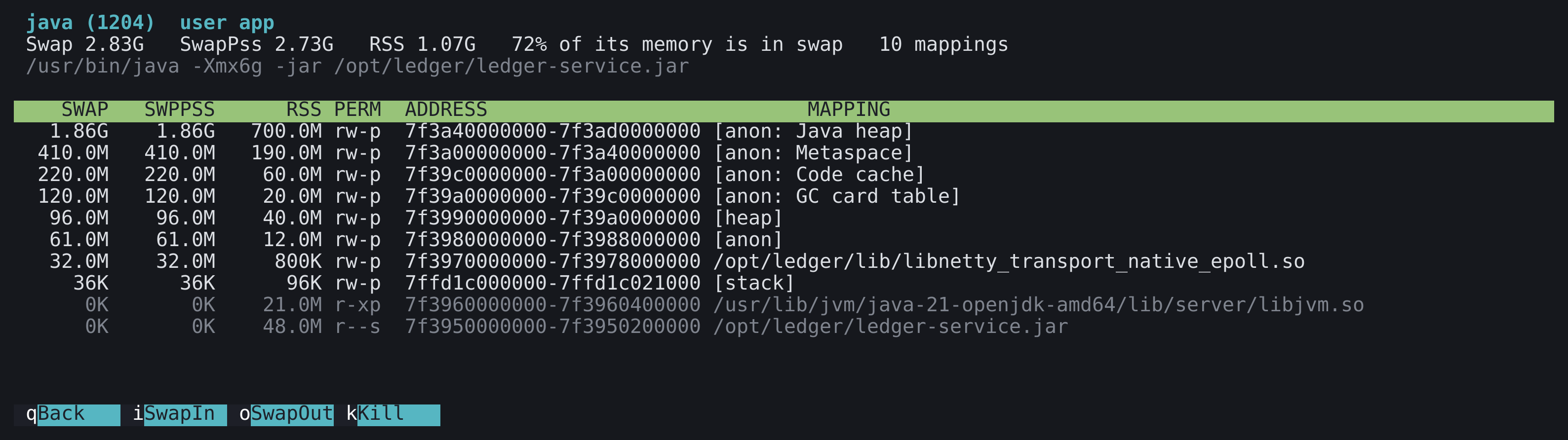
Press Enter on a process and it is broken down by memory mapping, biggest swap first: the heap, the stacks, individual libraries, anonymous regions. A JVM with 1.9 GB of its heap in swap looks very different from a process with a few old libraries paged out, and that decides whether you should care.
Seeing it as a tree
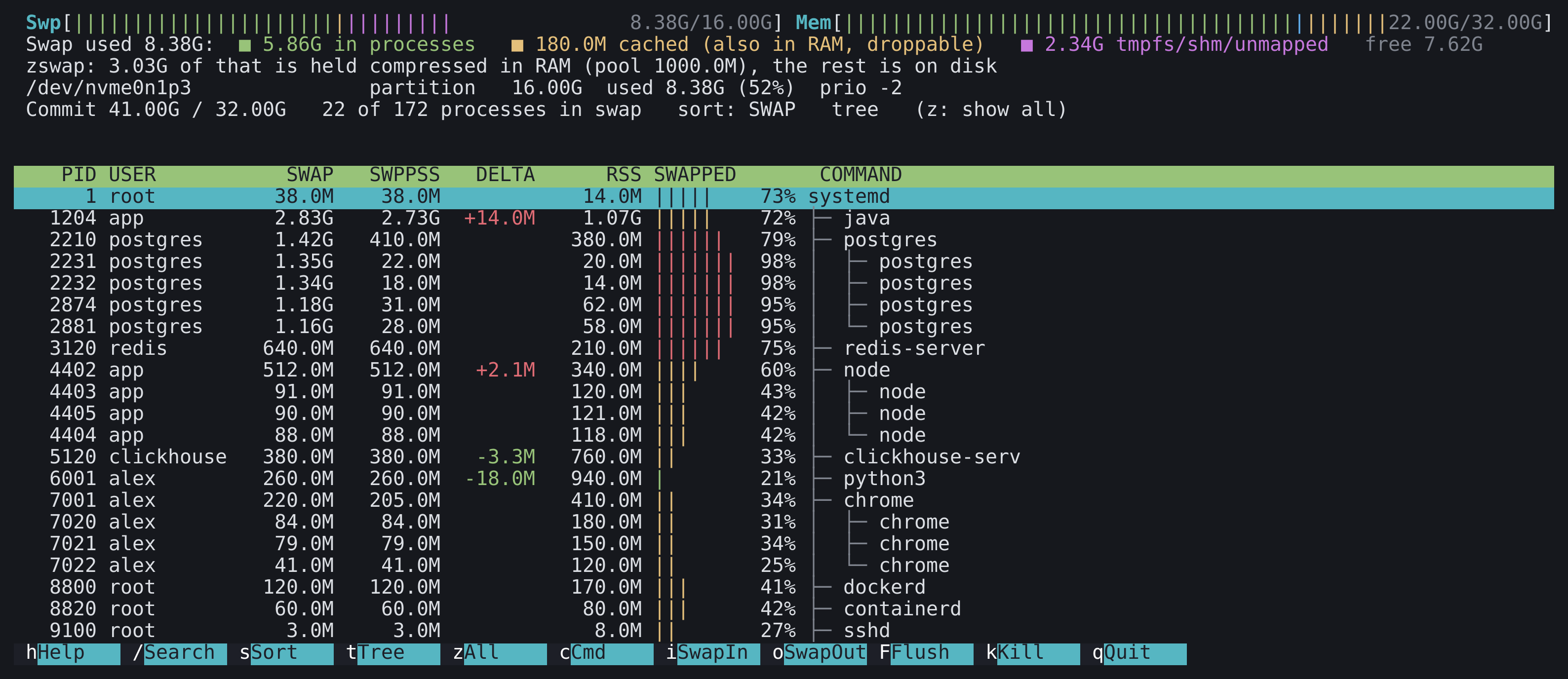
Press t for the process tree. Children sit under their parents, so a web server and its forty workers read as one thing. When you search, a parent stays visible if any of its descendants match, and processes with no swap are dimmed so the ones that matter stand out.
Doing something about it
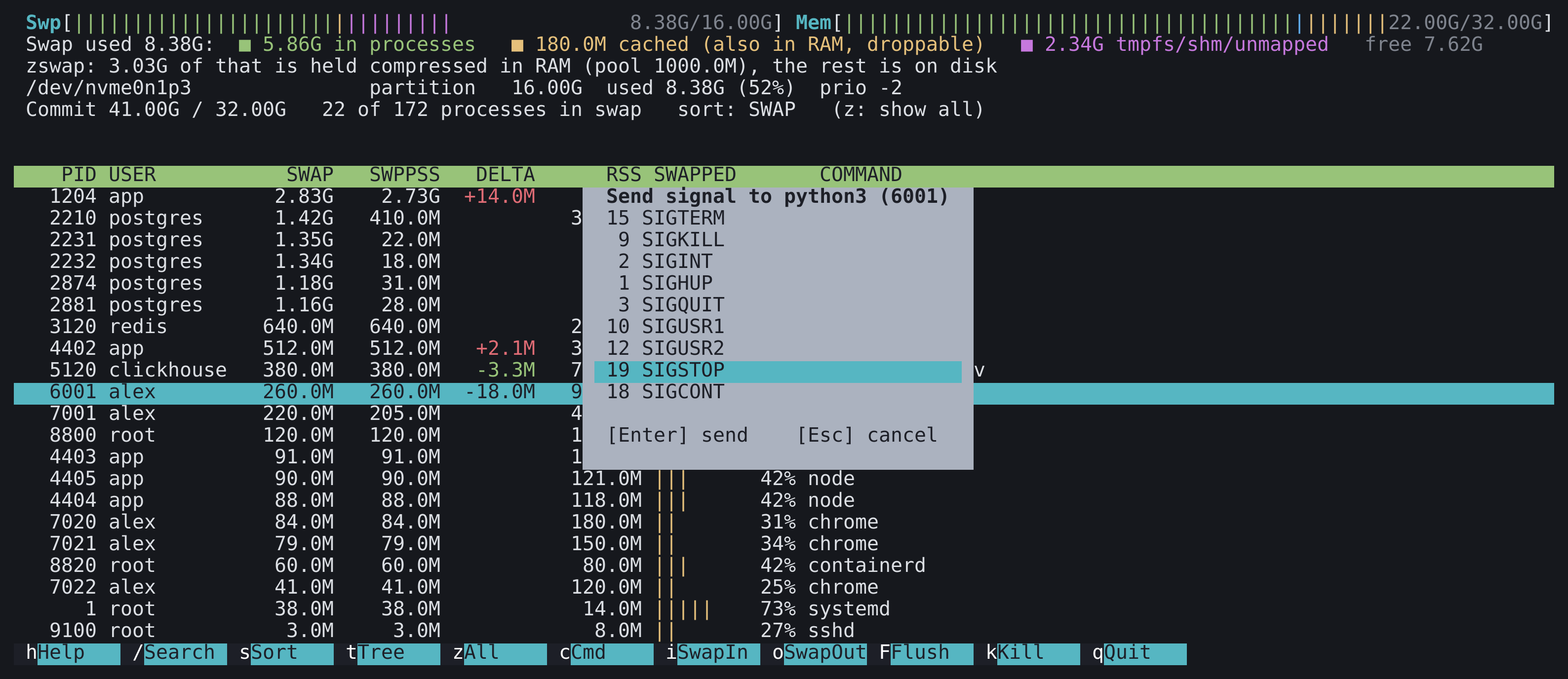
Every action asks first, and says what it is about to do.
- Swap in (
i): faults every swapped page of the selected process back into RAM, so it runs at full speed again. It checks the pagemap to find swapped pages and reads only those. - Swap out (
o): asks the kernel to reclaim a process's memory now. It is for parking a large process that is idle. Anonymous memory goes to swap, clean file pages are just dropped, and the process faults it back as it needs it. - Flush (
F): empties the whole swap device by turning it off and on again. It refuses if there is not enough free RAM to take everything back, because that is how you summon the OOM killer. - Signal (
k): a picker for TERM, KILL, INT, HUP, QUIT, USR1, USR2, STOP and CONT. STOP is handy for freezing a runaway process while you work out what to do with it.
Keys
Plain letters, no function keys, because those are taken by half the terminal emulators and the other half by tmux. h shows them all.
| Key | What it does |
|---|---|
Enter | Per-mapping breakdown of the selected process |
/ | Search by name, command line, user or PID |
s | Cycle the sort column: SWAP, SWPPSS, DELTA, RSS, SWAPPED, PID, USER, COMMAND |
t | Tree view |
z | Show every process, or only those with swap |
c | Command name or full command line |
i o F k | Swap in, swap out, flush, send a signal |
h q | Help, quit |
Your choices of sort, tree view and refresh rate are saved to ~/.config/swaptop/config when you quit, and the command-line flags override them for one run.
The screenshots show a made-up server I generated for the purpose, not a real machine.
Engineering decisions
- The numbers add up: the per-process figure that counts shared pages once per process cannot be summed, so the header uses the proportional figure, which can. Whatever is left over is shown as swap no process owns, rather than hidden in a rounding error.
- Honest about what it cannot see: without root the kernel hides other users' memory maps. The header says how many swapped processes could not be read, and the column shows a dash instead of a plausible zero.
- Shared memory is the awkward case: swapped tmpfs and shared pages leave nothing in the page tables, so the usual way of finding swapped pages does not see them. Swap in detects shared mappings and reads them whole instead.
- Careful about what can hurt: every action needs a yes, flush checks free RAM first and keeps the device's priority, and if turning swap back on fails after turning it off, the error says the device is off and needs re-enabling by hand.
- Read-only until you ask: nothing is written anywhere except the small config file when you quit. All the data comes from
/proc, with no daemon, no agent and no dependencies beyond a terminal library. - Tested against a live box: swap in and swap out were tried as root on test processes with private and shared memory, and the signed packages were installed from a clean Debian and a clean Fedora container. The flush action calls the same two system calls as
swapoffandswapon, but I have not run it against a loaded production swap device, so try it on something you can afford to reboot.
What it demonstrates
Linux memory management used for something practical: reading the kernel's own accounting rather than guessing, knowing which of its numbers add up and which do not, and driving it from a terminal interface with the same affordances people already know from htop. It ships as one binary with a manual page, packages for five architectures and a Homebrew formula.