mapsize: see where your disk went
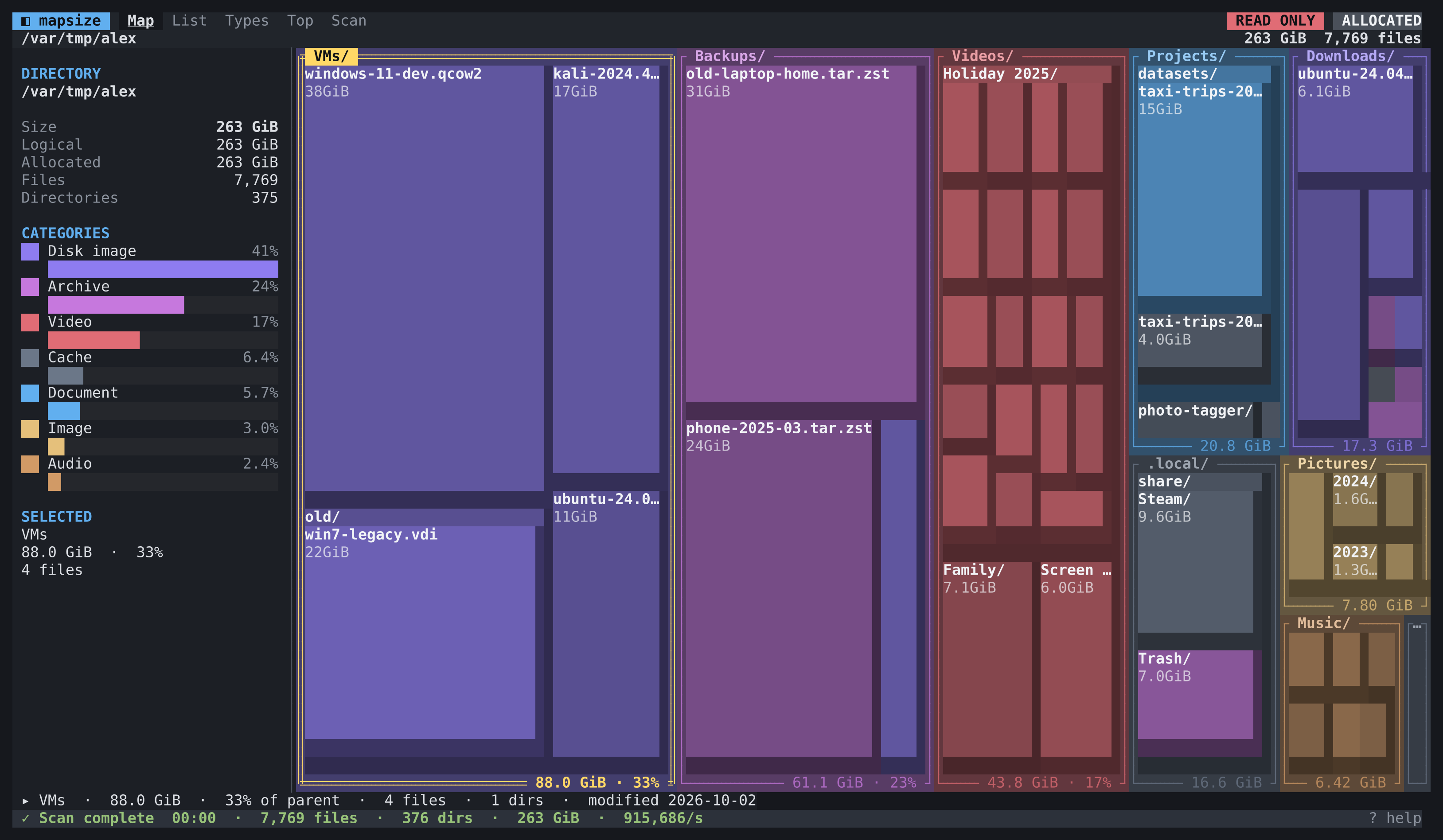
A disk usage analyser that lives in the terminal and shows you the answer as a picture. Point it at a folder and a treemap fills the screen, growing while the scan runs, with every block sized by what it actually costs on disk. Arrow keys move around the map, Space zooms in, and the 38 GB virtual machine you forgot about is the first thing you see.
- Go
- Terminal UI
- Linux, macOS, Windows, BSD
- Open source
Role:
Sole designer & engineer
Stack:
Go, Bubble Tea v2, one static binary
Status:
v1.0.0, GPLv3, on Homebrew
Install
On macOS or Linux with Homebrew, it is one line:
brew install andydixon/tap/mapsizeThat builds it from source, puts mapsize on your path and installs the manual page, so man mapsize works straight away. brew upgrade picks up new releases.
Then run it on whatever is filling up:
mapsize ~                 # explore your home folder
mapsize --read-only /srv  # look, but never delete anything
mapsize --help            # every flag
Without Homebrew
Every release has packages for the common Linux distributions and archives for everything else, with SHA-256 checksums alongside.
# Debian, Ubuntu
curl -LO https://github.com/andydixon/mapsize/releases/download/v1.0.0/mapsize_1.0.0_amd64.deb
sudo apt install ./mapsize_1.0.0_amd64.deb

# Fedora, RHEL, openSUSE
sudo dnf install https://github.com/andydixon/mapsize/releases/download/v1.0.0/mapsize-1.0.0-1.x86_64.rpm

# Alpine
curl -LO https://github.com/andydixon/mapsize/releases/download/v1.0.0/mapsize_1.0.0_x86_64.apk
sudo apk add --allow-untrusted ./mapsize_1.0.0_x86_64.apk

# Arch
curl -LO https://github.com/andydixon/mapsize/releases/download/v1.0.0/mapsize-1.0.0-1-x86_64.pkg.tar.zst
sudo pacman -U ./mapsize-1.0.0-1-x86_64.pkg.tar.zst

# Anywhere with Go
go install github.com/andydixon/mapsize/cmd/mapsize@latest
Packages are built for x86-64, ARM64, 32-bit x86 and ARMv7. Windows, macOS, FreeBSD, OpenBSD and NetBSD get a zip or tarball with the binary, the manual page and the licence: unpack it and run.
The itch
When a disk fills up there are two kinds of tool. The ones that tell you, like du and ncdu, give you a sorted list one directory at a time. The ones that show you, like WinDirStat and WizTree, draw the whole disk as a picture where big things look big, and you spot the problem in a second. The trouble is that the disks I care about are usually on servers, at the other end of an SSH session, where the picture tools cannot follow.
So I wanted the picture in the terminal. Not a static chart printed at the end, but a proper interactive map I could move around, zoom into and filter, that started drawing the moment the scan began instead of making me wait for it to finish.
Moving around the map
Each block is a folder or file, sized by how much disk it really uses, and coloured by what kind of thing it is: video, archives, disk images, code, caches and so on. Folders show a preview of what is inside them, and anything too small to draw is gathered into a single "N smaller items" block until you zoom in far enough to see it.
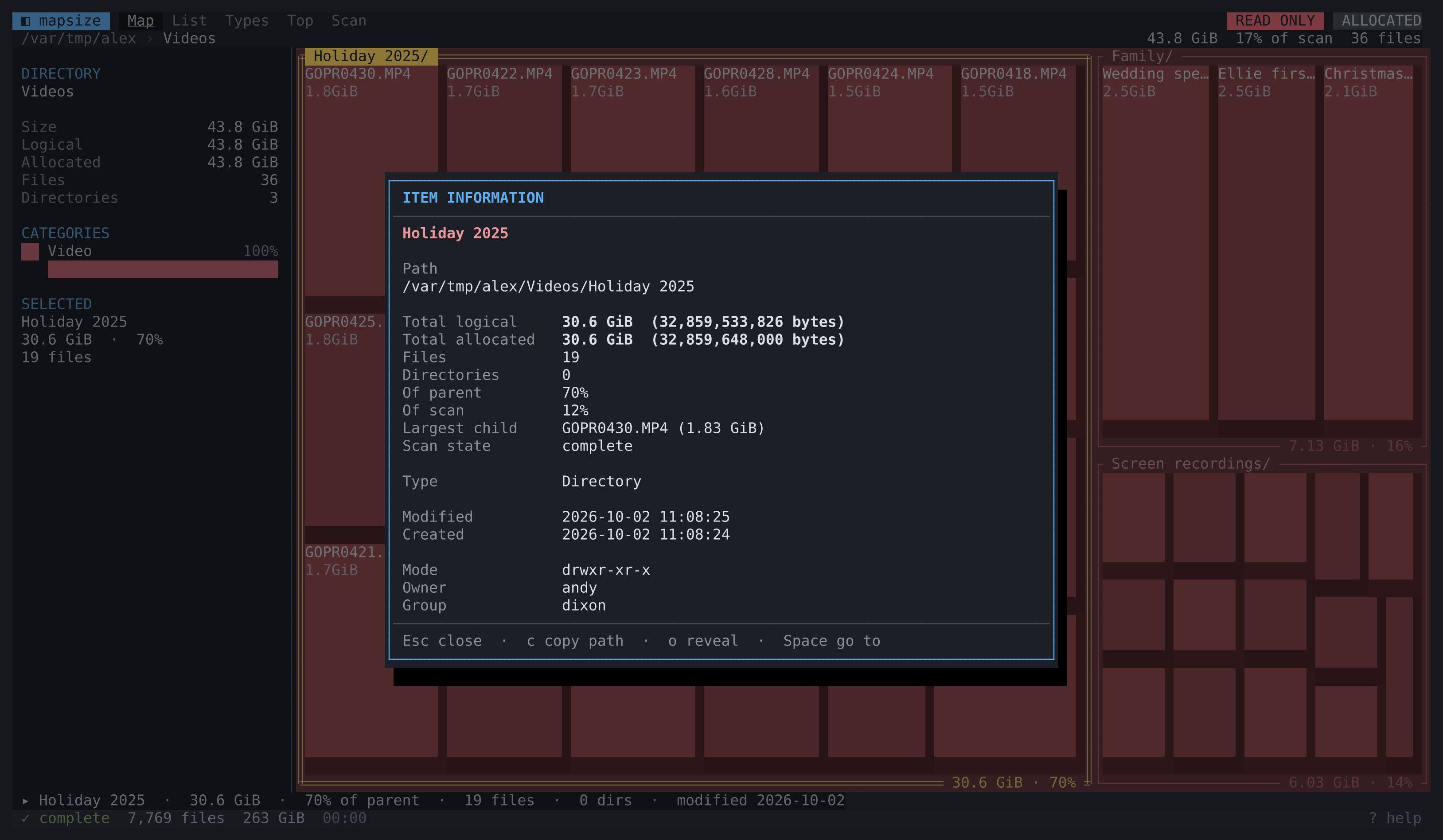
The arrow keys move to whichever block is actually to the left, right, above or below, the way your eyes expect, rather than stepping through a list. Space zooms into a folder, Backspace comes back out, and Enter opens the details: sizes, file counts, dates, owner and permissions.
Asking questions
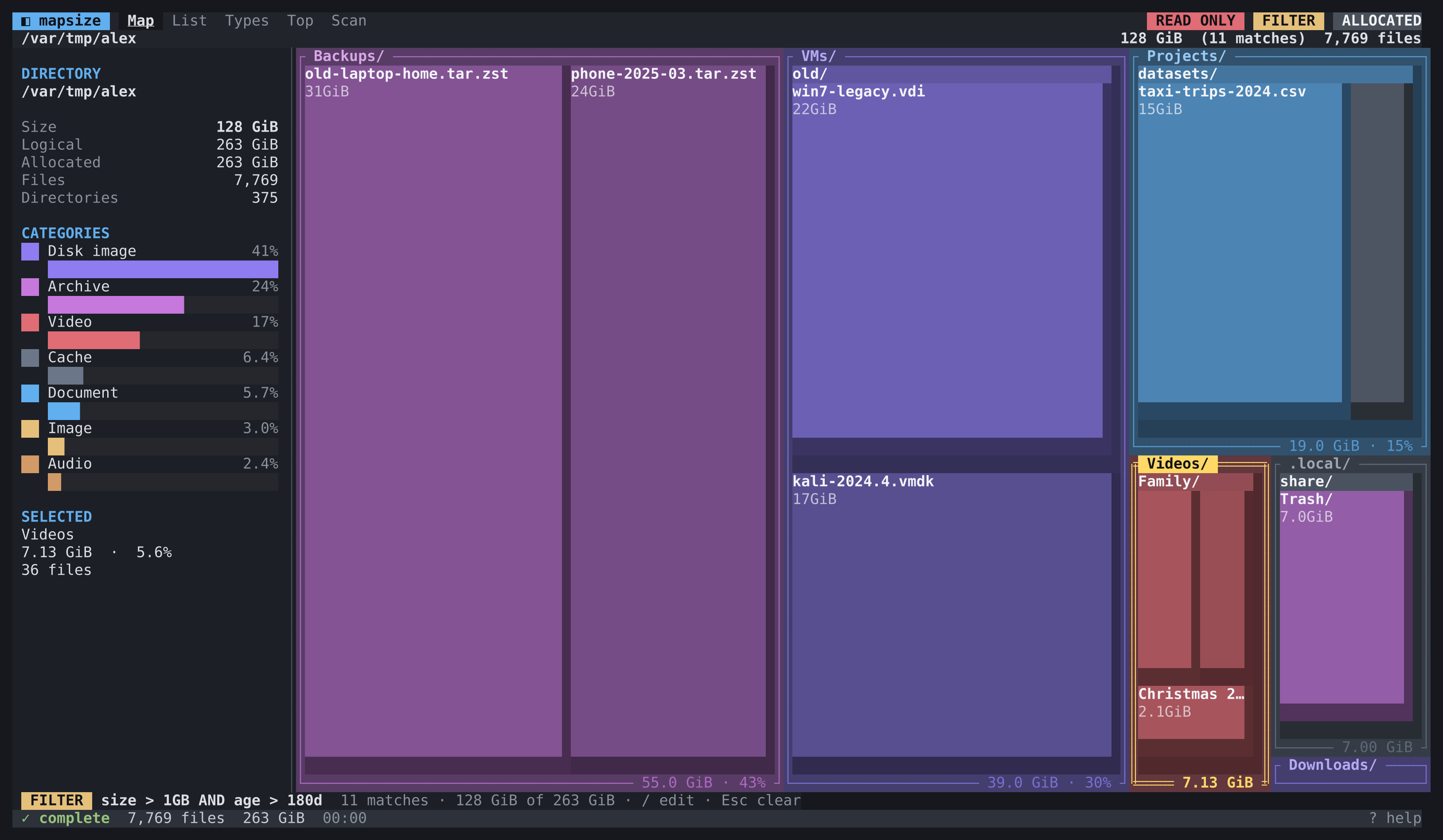
Press / and type a question. The map redraws to show only what matches, so you can see where it lives as well as how much there is. The query language is small enough to guess:
*.isoorext IN (iso,qcow2,vmdk)for disk imagessize > 5GBfor the big stuffage > 365dfor things nobody has touched in a yearpath contains cache AND NOT type = dirto find what caches really hold
Other ways of looking
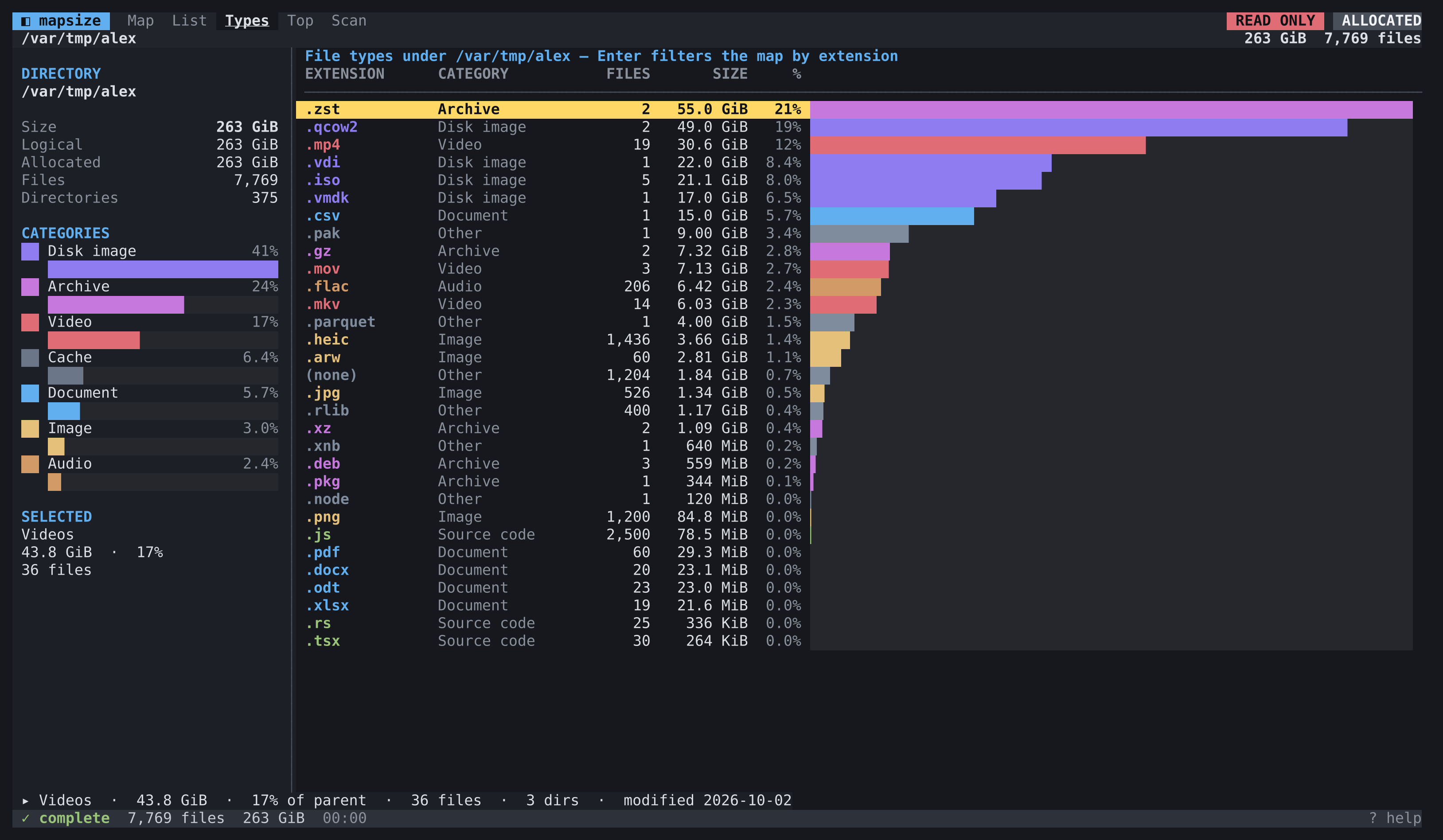
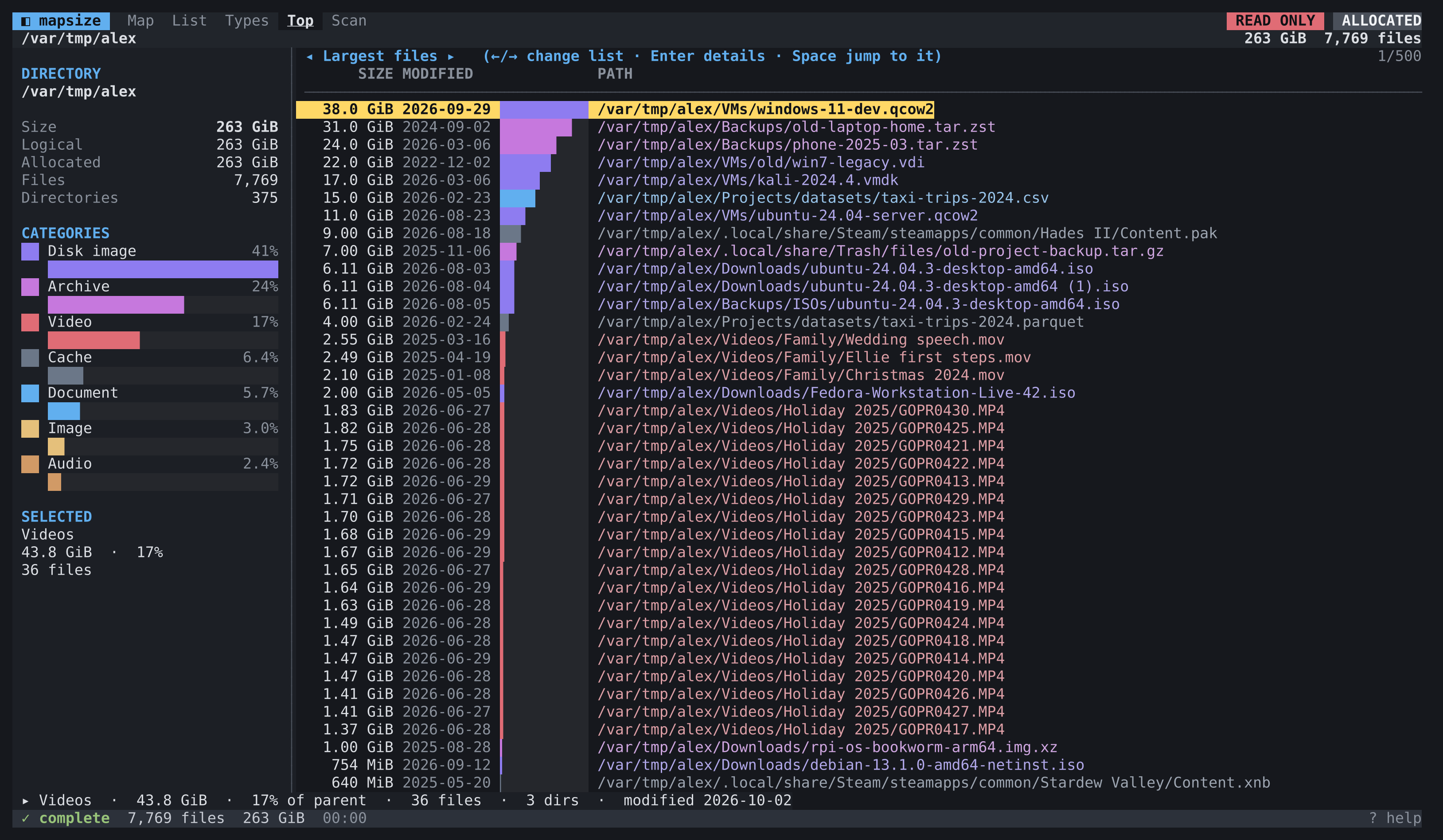
Tab switches between views of the same scan. File types totals everything by extension. Top lists rank the largest files and folders, the oldest and newest large files, the folders with the most entries, and any sparse or hard-linked files. Scan information lists every error and anything that was skipped, so you know exactly how complete the numbers are.
Duplicates
Press D and mapsize looks for files that are byte-for-byte identical. It groups by size first, samples, and only then hashes the survivors in full with SHA-256, so most files are never read at all. Nothing is reported as a duplicate unless the full hashes match.
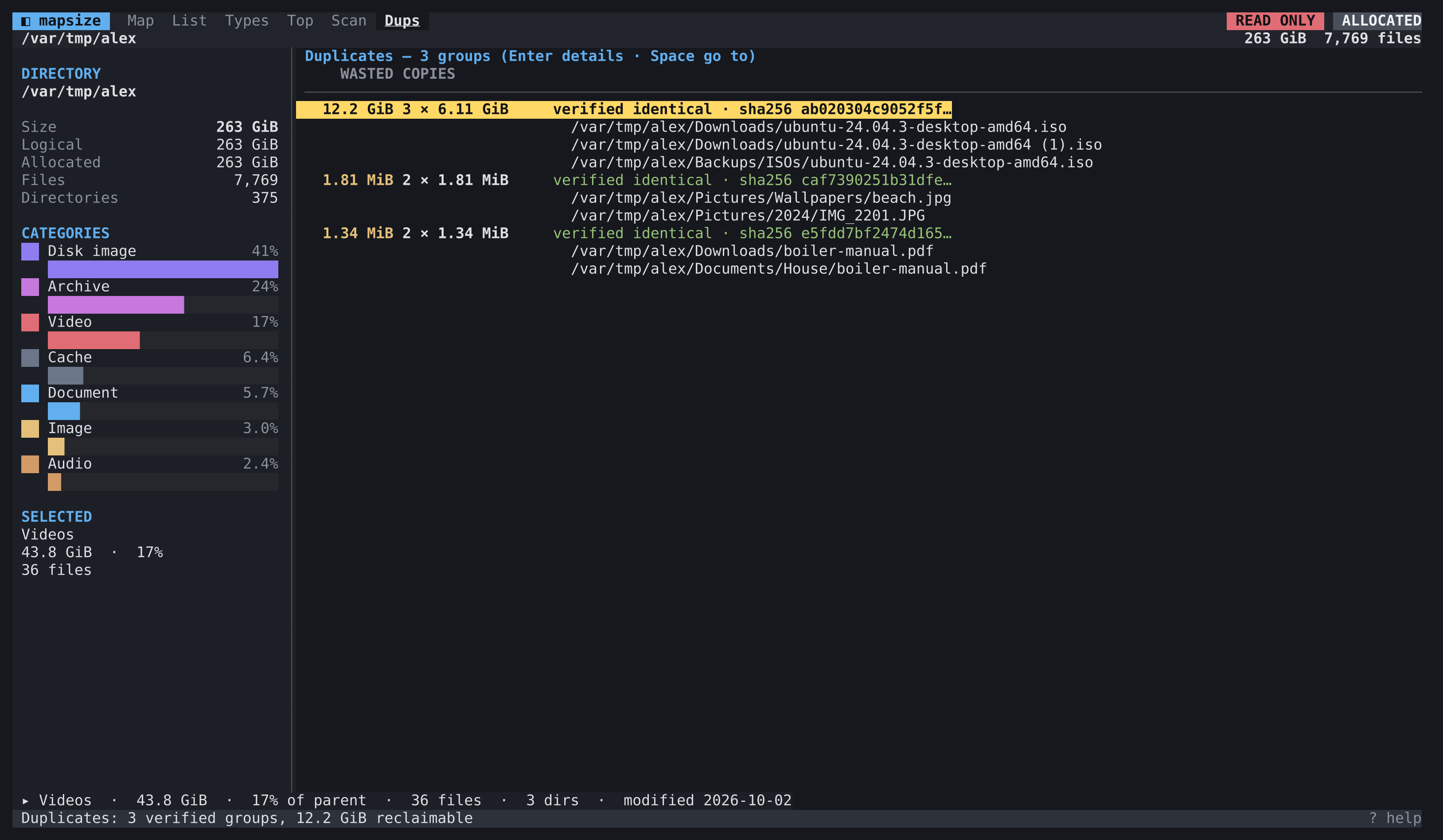
The screenshots show a made-up home folder I generated for the purpose, not anyone's real files.
Engineering decisions
- Honest numbers: sizes are what files occupy on disk, not what they claim to be, and you can switch to logical size with
a. Hard links are counted once, likedudoes. Sparse files are flagged. If anything could not be read, the totals say they are incomplete rather than quietly undercounting. - Fast without being greedy: a bounded pool of workers scans directories in parallel and feeds results into the map as they arrive. On my test machine it gets through around 950,000 entries a second from a warm cache, about three times quicker than
duon the same tree, using roughly 158 bytes of memory per file. - A layout that respects the terminal: the treemap is the squarified algorithm, snapped to character cells by rounding edges rather than widths, so neighbouring blocks always meet exactly. Resizing the window recomputes the layout for the new shape instead of stretching the old one, and the selection survives resizes, rescans and filters.
- Hostile filenames are data, not commands: a filename can contain escape sequences that would rewrite your terminal. Every name passes through one sanitiser that shows control characters as visible escapes, and the renderer refuses them again as a second line of defence.
- Careful with deleting: moving something to the bin always asks first and uses the system's own bin on Linux, macOS and Windows.
--read-onlyswitches every destructive action off, for when you are poking around somewhere that matters. - Snapshots you can trust: save a scan, reopen it instantly, or compare two and see growth and shrinkage coloured on the map. The format is versioned and checksummed, and the loader treats every snapshot as hostile input, so a corrupt or malicious file fails cleanly.
What it demonstrates
Taking a familiar idea and finishing it properly for an awkward environment: concurrency that stays bounded under pressure, a layout engine built for a grid of characters, keyboard navigation that follows the geometry on screen, and the unglamorous security work a tool needs when it prints untrusted strings to a terminal. It ships as one binary for six operating systems, with Linux packages and a Homebrew tap, and the measurements in the repository are real ones.