Post-quantum file encryptionvault.
Your files, encrypted against tomorrow's quantum computers. Their names, sizes and dates, gone. And a trapdoor for the day someone makes you open it.
01What it does
One folder. Two very different views.
You give vault a file. It encrypts it into your vault, which is just a folder, and gives it back when you ask. Put in, take out.
The interesting part is what that folder looks like from outside. Flip the switch:
- Random names, scattered across folders
00toff. - Every catalogue entry exactly 18,704 bytes; contents in round-sized pieces, none over 4 MiB.
- Every date 1 January 1970. None of your folders.
sam@laptop ~ $ vault list
   1.1 MiB  2026-10-02 16:42  id/passport-scan.jpg
      21 B  2026-10-02 16:43  ideas/notes.md
      15 B  2026-10-02 16:42  letters/landlord.txt
 179.1 KiB  2026-10-02 16:42  tax-return-2025.pdf
02Why it's different
Three things most encryption tools don't do
It's post-quantum
Someone can copy your encrypted files today and wait for a quantum computer: harvest now, decrypt later. vault wraps every file key with FrodoKEM-640 and ML-KEM-768. An attacker has to break both.
It hides the metadata
Plenty of tools encrypt what's in a file and leave divorce-papers-final-v3.pdf in plain sight. vault encrypts the names, the sizes and the timestamps too.
It can lie for you
A key can have a second, decoy passphrase that opens a completely separate set of files. Your real ones don't appear, don't error and leave no hint. See it work.
What vault is not
- Not a sync service. It's a folder. Sync the folder yourself if you like; vault doesn't.
- Not a backup by itself. One copy of anything is zero copies. Back up the vault folder and your key.
- Not magic against malware. If something is watching your keyboard as you type the passphrase, no file encryption tool can help.
- Not recoverable without the passphrase. No reset link, no back door. That's the point, and it cuts both ways.
Got two minutes? Here's all of it
vault genkeyMake your key. Pick a good passphrase.vault initMake your vault.vault add taxes.pdfPut something in.vault lsSee what's in there.vault get taxes.pdfGet it back out.
That's the tool. The rest of this page is detail, safety rails and the decoy trick.
03Install
Download, check, run
vault is a single self-contained program: no installer, no runtime, no dependencies. Pick the file for your system (yours is highlighted if your browser says what it is), check it, rename it to vault (or vault.exe) and put it on your PATH.
vault-windows-amd64.exe
Windows on ARMSurface Pro X, Snapdragon laptopsvault-windows-arm64.exe
Mac, 2020 or laterApple silicon (M1, M2, M3…)vault-darwin-arm64
Mac, Intelolder Macsvault-darwin-amd64
LinuxPCs and servers, almost everythingvault-linux-amd64
Linux on ARM64Pi 4/5 on a 64-bit OS, Graviton, Amperevault-linux-arm64
Raspberry Pi, 32-bitPi 2, 3, 4 on a 32-bit OSvault-linux-armv7
Raspberry Pi Zero / 1the tiny older onesvault-linux-armv6
Androidin Termuxvault-android-arm64
Everything elseBSDs, RISC-V, POWER, s390x, MIPS, LoongArch, AIX, Solaris, illumos, Plan 9, WebAssemblyall 43 builds
Not sure which Linux you have? Run uname -m: x86_64 is amd64, aarch64 is arm64, armv7l is armv7 and armv6l is armv6.
Check the file hasn't been tampered with
Every release has a SHA256SUMS file. Checking takes ten seconds, and for an encryption tool it's the difference between running vault and running something pretending to be vault.
# Linux
sha256sum -c SHA256SUMS --ignore-missing

# macOS
shasum -a 256 -c SHA256SUMS --ignore-missing

# Windows (PowerShell): compare with the line in SHA256SUMS
Get-FileHash .\vault-windows-amd64.exe -Algorithm SHA256
You want to see OK. Anything else: stop, and download it again.
Put it on your PATH
Linux and macOS, from the folder you downloaded into:
sha256sum -c SHA256SUMS --ignore-missing
chmod +x vault-linux-amd64
sudo mv vault-linux-amd64 /usr/local/bin/vault
vault help
No admin rights? Use ~/.local/bin, which most distributions already have on the PATH.
macOS says the file "cannot be opened"? It isn't signed by Apple, so Gatekeeper quarantines it. Once you've checked the SHA-256, clear the flag: xattr -d com.apple.quarantine /usr/local/bin/vault.
Windows: make a folder such as C:\Tools, move the file in renamed to vault.exe, search the Start menu for "environment variables", open Edit the environment variables for your account, add C:\Tools to Path, and open a new terminal.
Android (Termux), after downloading with your phone's browser and running termux-setup-storage once:
cp ~/storage/downloads/vault-android-arm64 .
chmod +x vault-android-arm64 && mv vault-android-arm64 $PREFIX/bin/vault
Manual pages
There's a manual page for vault and one for every command. Download vault-man-pages.tar.gz, then:
mkdir -p ~/.local/share/man/man1
tar -xzf vault-man-pages.tar.gz -C ~/.local/share/man/man1
man vault-absorb
Did it work?
Run vault help and you should see every command on one screen:
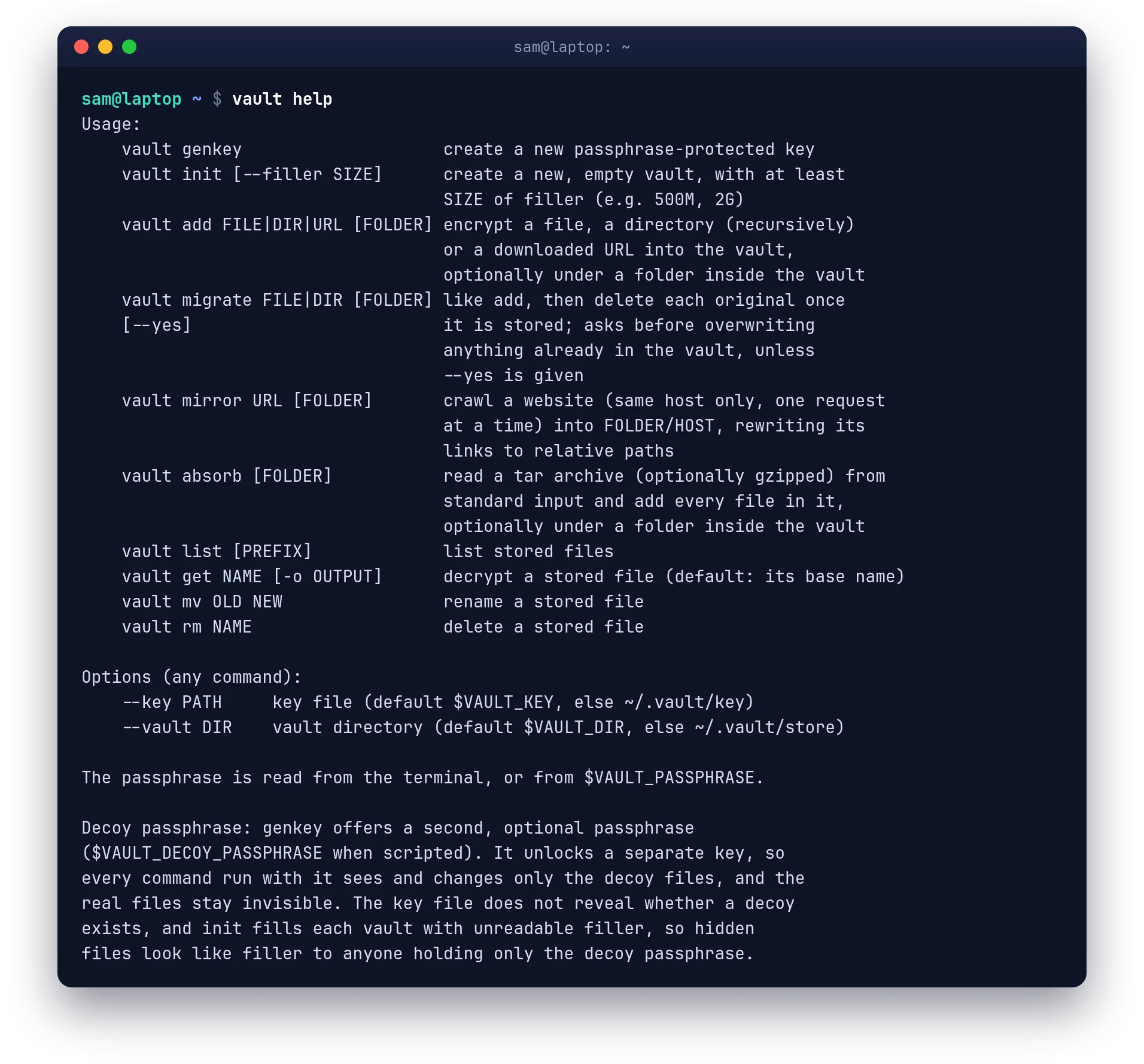
vault help: everything vault can do.Building it yourself
With Go 1.26.6 or newer, go build . makes a binary for your platform, and ./build.sh cross-compiles all 43 targets into ./dist with a SHA256SUMS. Set TARGETS for a subset and OUT for a different folder. The builds are static and reproducible: no C code, paths stripped, build IDs zeroed, so two people building the same commit get byte-identical files.
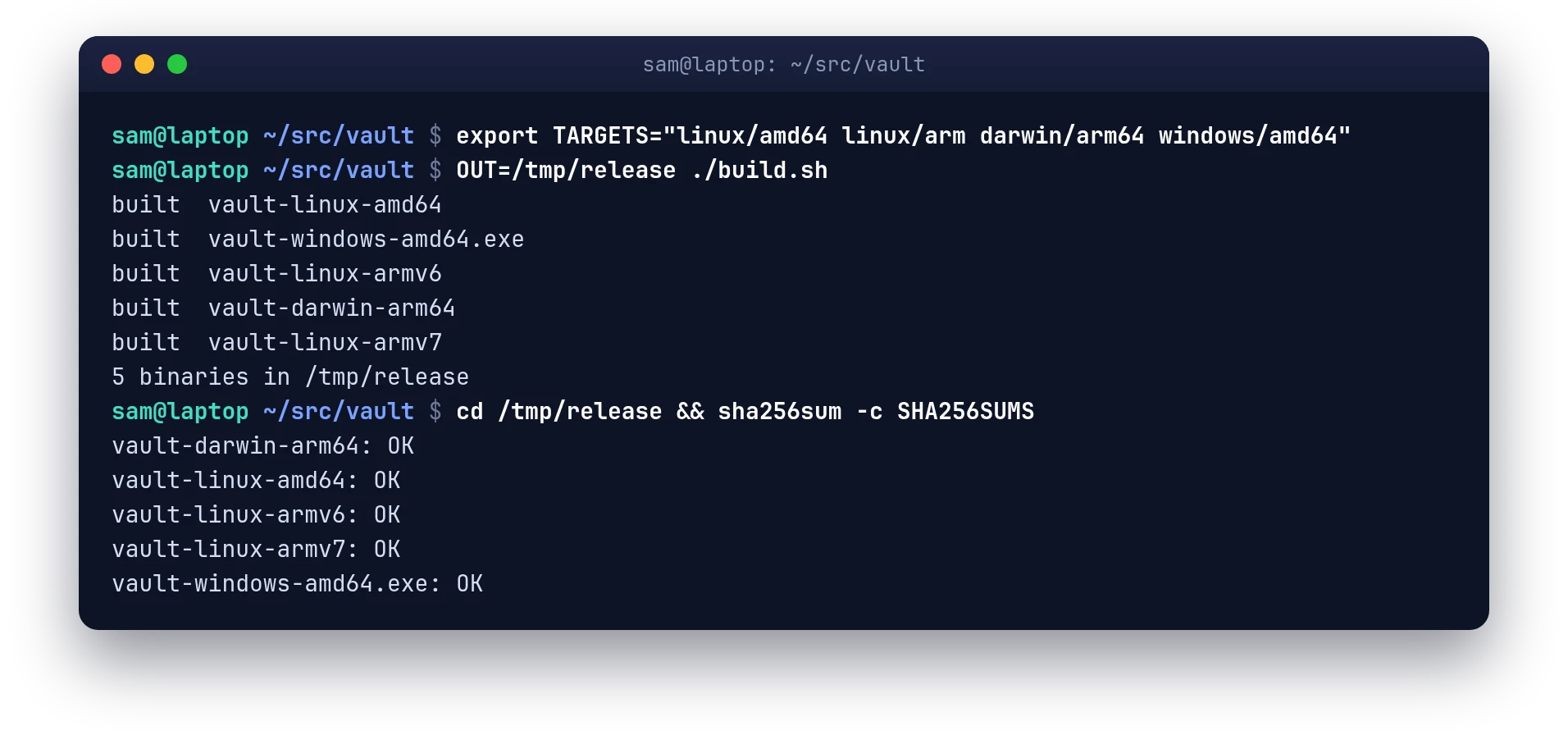
SHA256SUMS.04Your key
The one file that matters most
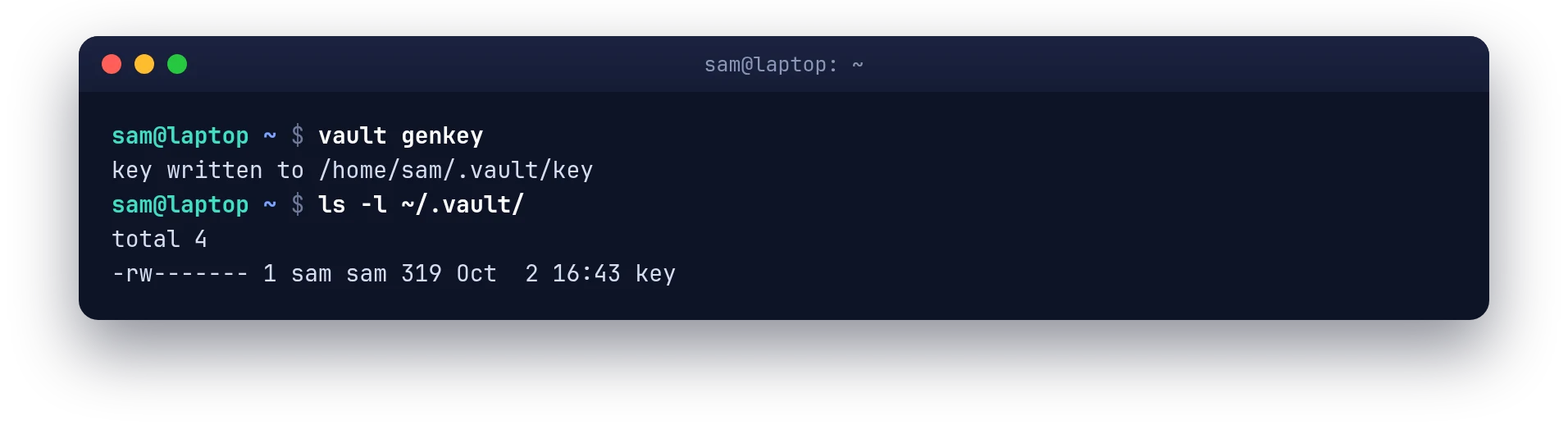
vault genkey creates your key at ~/.vault/key, protected by a passphrase. It asks twice, and nothing appears as you type. That's deliberate, not broken.
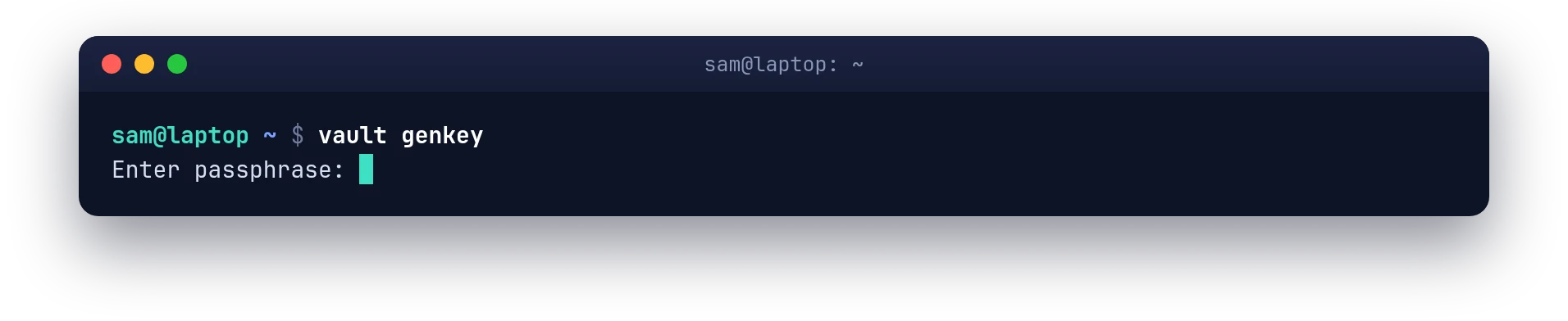
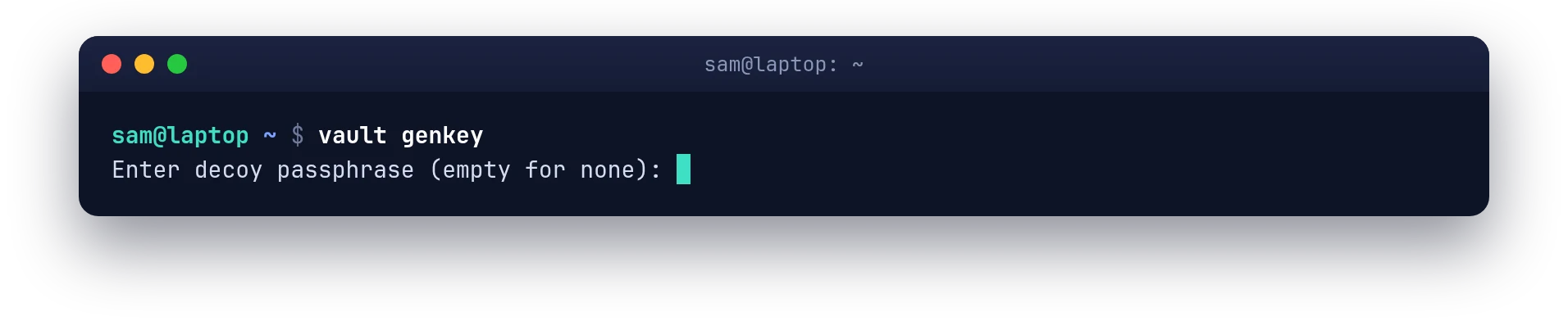
The decoy can only be set here, when the key is made. If you might ever want one, set it now. It costs nothing and nobody can tell it's there.
Choosing a passphrase that doesn't suck
The key is sealed with your passphrase through Argon2id, a deliberately slow, memory-hungry function: every guess costs an attacker real time and 64 MiB of memory. That only helps if there are a lot of guesses to make.
- Use four or more random words. correct horse battery staple beats P@ssw0rd! by a mile, and you can remember it.
- Make it unique. Not your email password, not your bank's.
- Make the decoy believable. Something you would genuinely pick.
Use a password manager's passphrase generator, then type it five times. Muscle memory is a legitimate security tool.
Where it lives
By default the key is ~/.vault/key (%USERPROFILE%\.vault\key on Windows). Put it somewhere else, such as a USB stick, with --key or VAULT_KEY:
vault genkey --key /media/usb/vault.key     # this once
export VAULT_KEY=/media/usb/vault.key       # every command from now on
Keeping the key on a stick and the vault on your laptop is a neat trick: pull the stick out and the vault is inert, even to someone who knows the passphrase. Two things to steal instead of one.
Back. It. Up.
If you lose the key file, or forget the passphrase, your files are gone. Not "hard to get back". Gone. There's no recovery mechanism, no master key and no back door.
The key file is encrypted, so a copy is safe somewhere a little less private than your laptop: a USB stick in a drawer (or two, in two drawers), an attachment in your password manager, or printed out. Inside are two equal-sized encrypted slots in random order, and each passphrase opens exactly one. With no decoy, the spare slot is random bytes that look exactly like an encrypted slot, so the file says nothing about whether a decoy exists.
05Your first vault
One command, and a peek inside
vault init creates an empty vault at ~/.vault/store. No passphrase needed: an empty vault has nothing to protect yet.
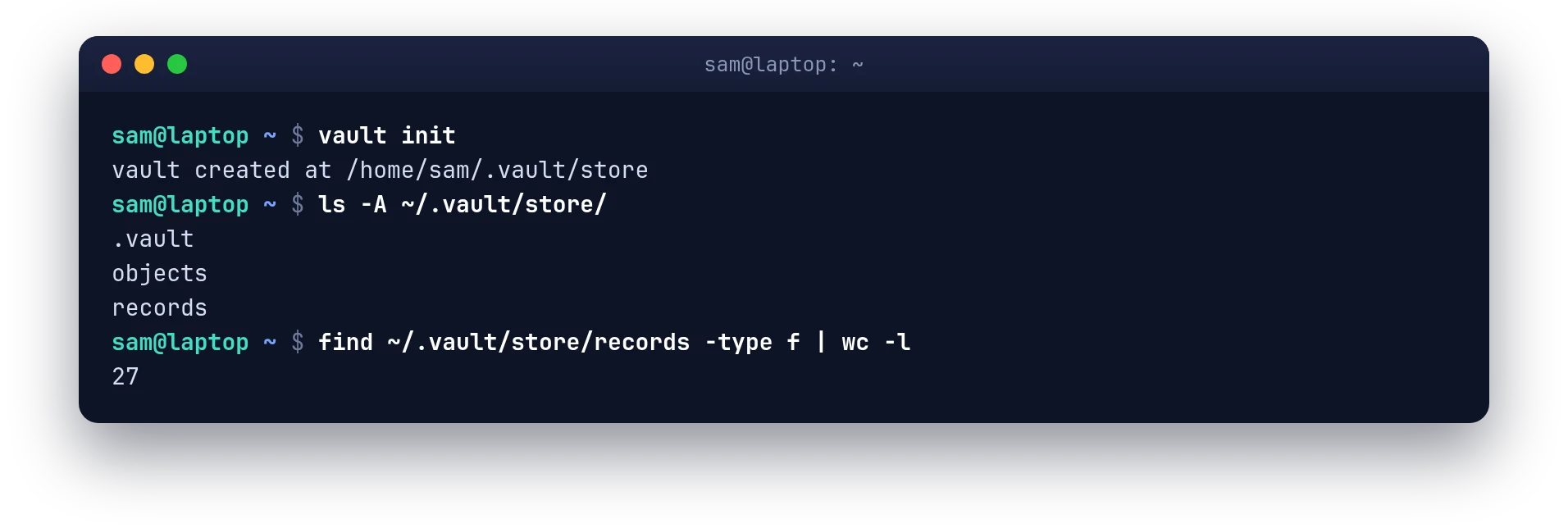
Inside records/ and objects/ are 256 folders each, named 00 to ff. Every encrypted file lives in the one matching the first two characters of its name, which keeps any one folder from getting huge. All 256 exist from the start, so the layout itself gives nothing away.
Wait, why is there already stuff in it?
A new vault holds between 8 and 32 entries of random filler, encrypted to a key that was thrown away the moment it was used. Nobody can open them: not you, not anyone. It's what makes the decoy believable. Every vault, decoy or not, always contains entries you can't open, so someone holding your decoy passphrase finds nothing remarkable about entries they can't read.
More filler, for bigger secrets
vault init --filler 2GThe default few tens of megabytes of filler can only cover for a few files. Sizes take K, M, G or T. The filler is shaped like a real collection, small and large "files" mixed, so a big file of yours sits among big files of filler. It can only be chosen at init: added later, it would show up as a burst of new entries, which is exactly what it's meant to hide.
Rule of thumb: set --filler to at least as much as you'll ever hide from the decoy passphrase. Without a decoy, you don't need it.
More than one vault
vault init --vault ~/work-vault
vault add contract.pdf --vault ~/work-vault
Or set VAULT_DIR in your shell profile and never type --vault again. One key works with any number of vaults.
06Everyday moves
add, list, get, mv, rm
The five commands you'll actually use. Each asks for your passphrase.
Putting things in: add
vault add FILE-OR-FOLDER-OR-URL [FOLDER-IN-VAULT]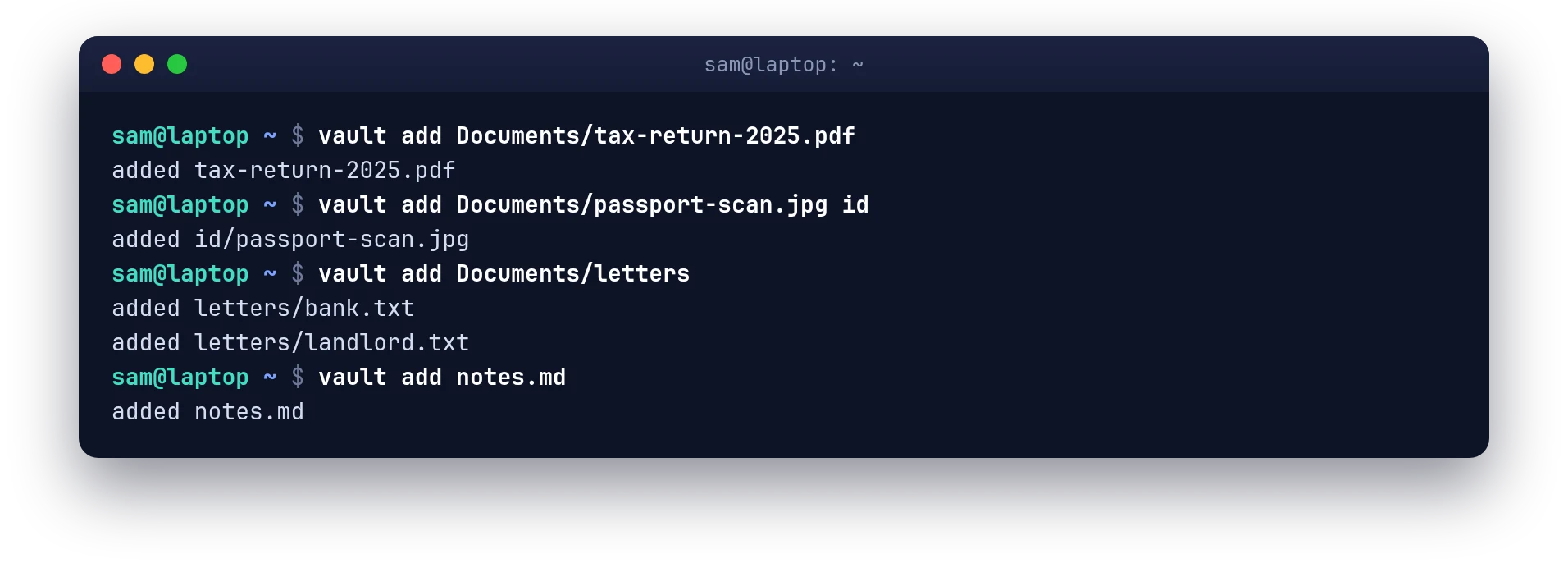
Documents/tax-return-2025.pdfbecame plaintax-return-2025.pdf: vault keeps the file name, not the path you typed.- With a second argument, the passport scan landed in
id/passport-scan.jpg. - Adding the folder
Documents/letterskept its name and structure:letters/bank.txt,letters/landlord.txt. - Adding
.brings in a folder's contents, subfolders and all, without a folder name of its own.
Folders inside a vault aren't real folders, just part of each file's name, so there's no mkdir and a folder disappears with its last file. Adding a name that already exists replaces it, and the old version is deleted only after the new one is safely stored, so a crash never leaves you with neither. Anything that isn't a plain file (symbolic links, sockets, devices) is skipped with a note, and so are the vault and key themselves if they live inside the folder. Files over 1 TiB are refused.
Seeing what's inside: ls and list
vault ls              # the top level: folders (ending in /) and files
vault ls letters      # one level down, inside letters/
vault list            # every file, all the way down, full names
ls works like the shell's: one folder at a time. Each sub-folder appears once, ending in /, with the total size of everything inside it and its newest date; files show their own size and date. Folders come first, then files, and vault ls letters/2025 keeps going down. list is the whole catalogue in one go, with full names: the one to pipe into other commands. vault ls -r does the same.
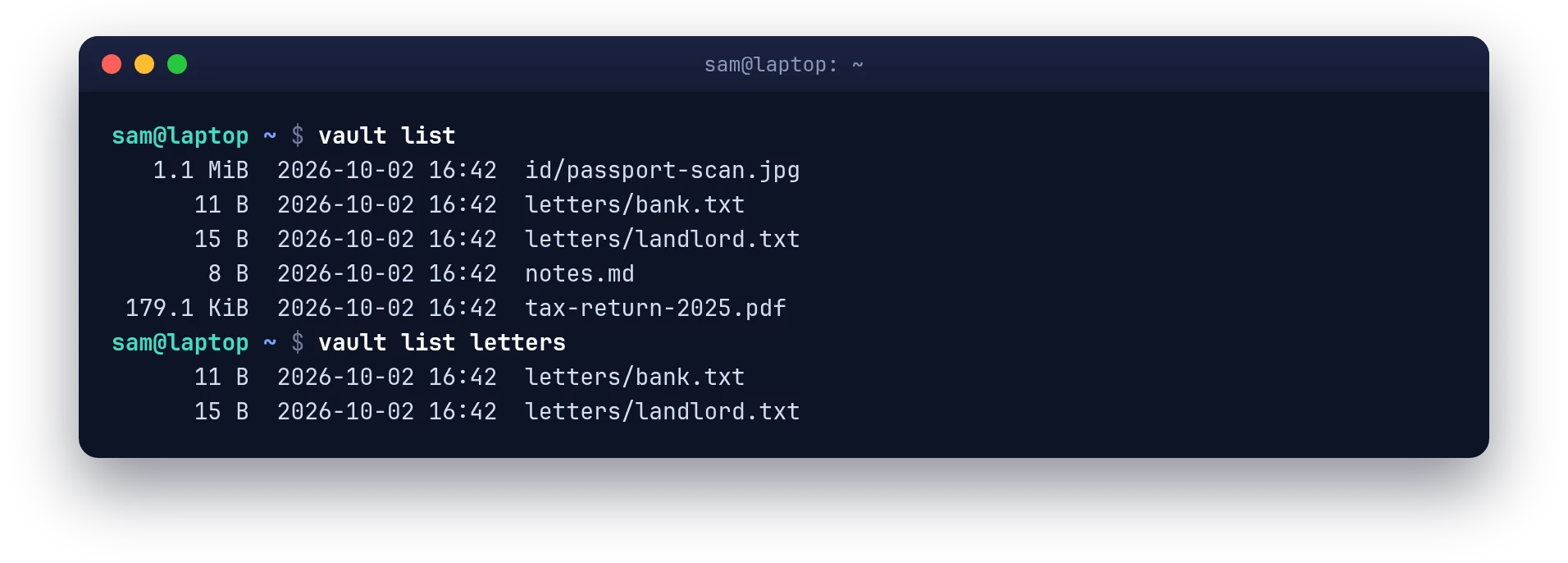
ls, then everything with list.Each line is the size, the file's own modification time and its name, sorted. list needs your passphrase because the names are encrypted too: without the key, vault can't read the catalogue any better than a thief can.
Getting things out: get
vault get NAME               # writes the file here, under its own name
vault get NAME -o OUTPUT     # writes it wherever you say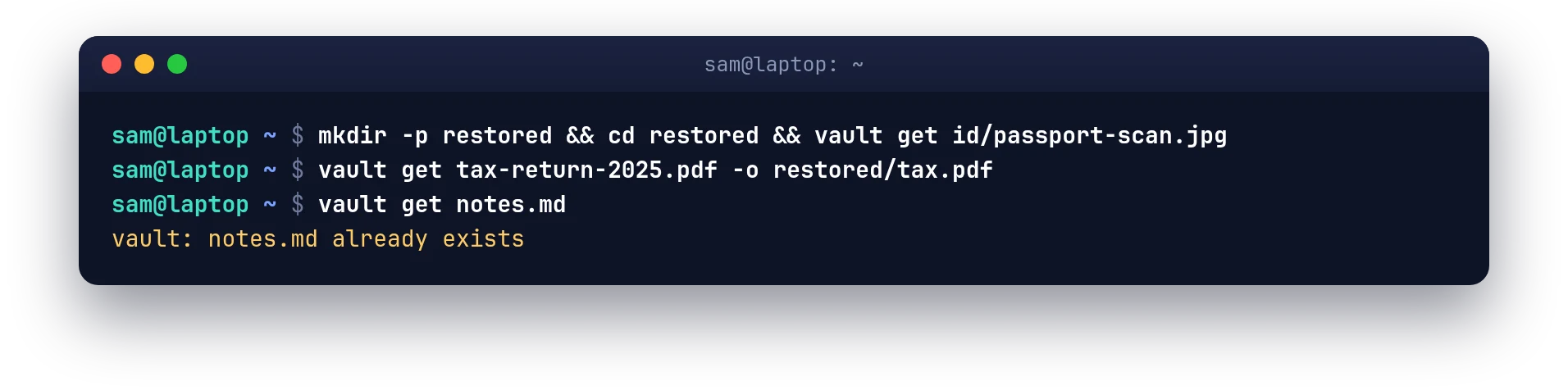
- It never overwrites. If the output exists, vault stops. Move the old one or use
-o. - Nothing appears until everything checks out. vault writes to a hidden temporary file, verifies every byte, and only then gives it its real name. A tampered or damaged file never shows up half-written.
- It restores the details: the original permissions and modification time.
Renaming and deleting: mv and rm
vault mv notes.md ideas/notes.md    # NEW is the full new name, folder included
vault rm letters/bank.txt           # one file, immediately
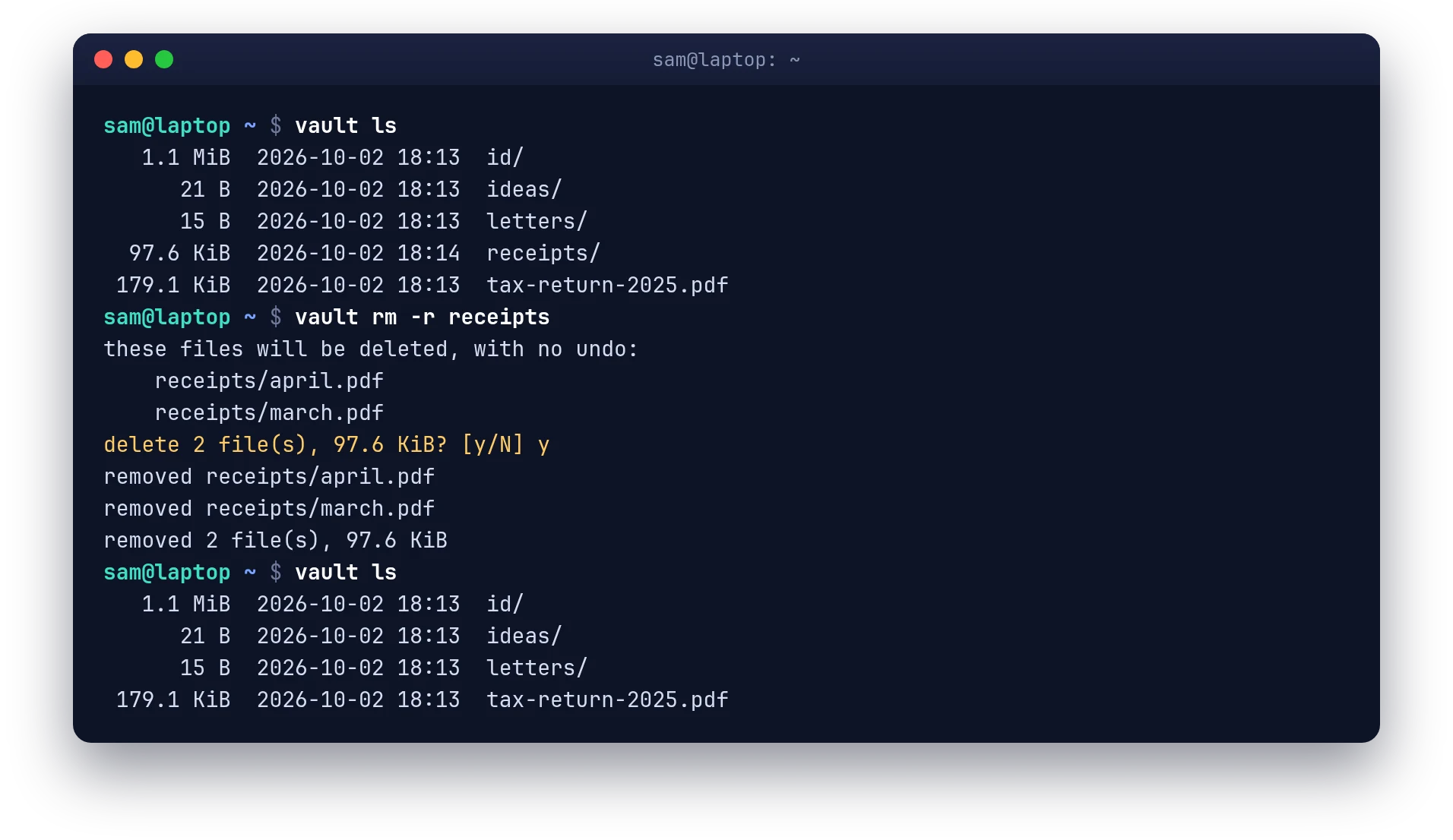
vault rm -r old                     # a folder and everything in it; asks first
vault rm -rf old                    # the same, without asking
mv won't overwrite an existing name and doesn't re-encrypt anything, so it's instant at any size. rm removes the catalogue entry and every encrypted piece of the file, so the space comes back straight away.
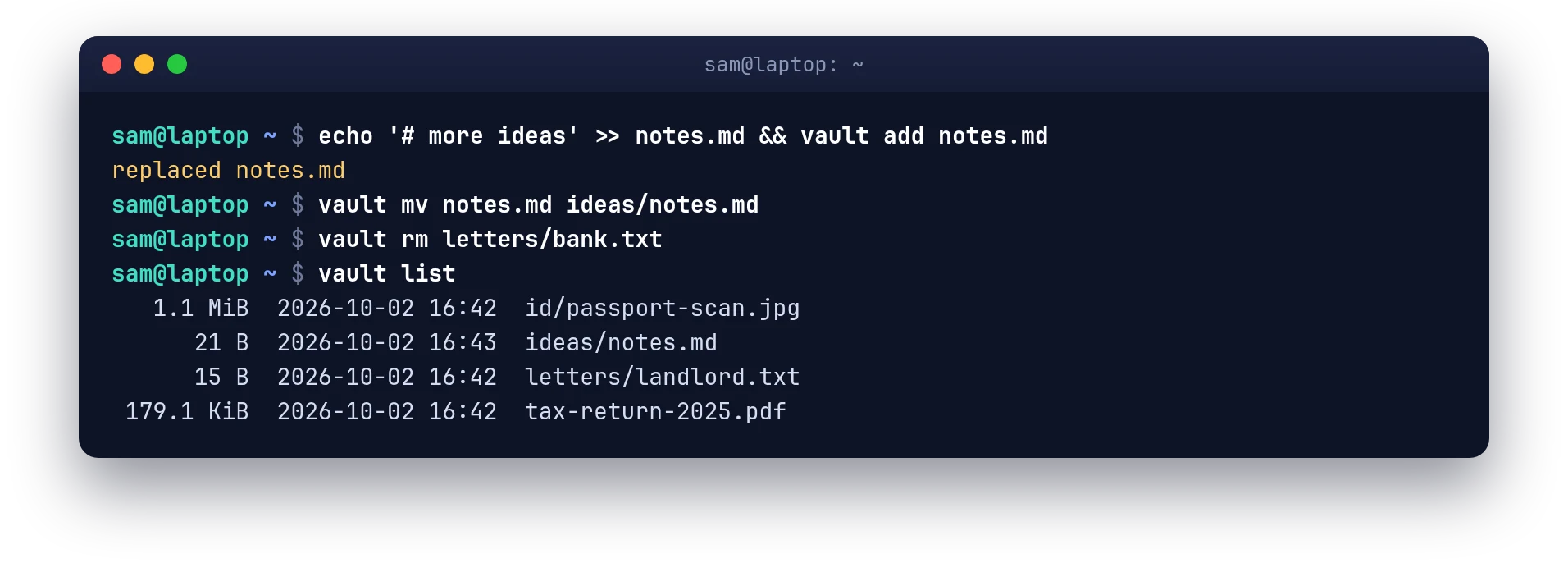
rm is immediate and there's no undo. No recycle bin. If it matters, make sure it's backed up first.
Deleting a whole folder: rm -r
rm -r deletes a folder and everything under it. Because that can be a lot, it first lists what's going (the first 20 names, then a count) with the total size, and asks. Anything but y deletes nothing, and so does having no terminal to ask on. -f skips the question and also means "don't complain if there's nothing there", so rm -rf is the one for scripts. vault rm -r / is refused rather than emptying the vault.
Flags work anywhere
--key PATH and --vault DIR work with every command, before, between or after the arguments:
vault add --vault ~/work report.pdf
vault add report.pdf --vault ~/work
vault add report.pdf --vault=~/work07More ways in
URLs, whole websites and tar streams
Straight from the web
Give add an http:// or https:// address and vault downloads it (with a Chrome user agent, so fussy sites play along) and stores it under the last part of the address. The download sits in a private temporary file only until it's encrypted.
vault add https://example.com/reports/annual.pdf work # stored as work/annual.pdfCopying a website: mirror
mirror crawls a whole site, one request at a time and only on the same host, into a folder named after the host. Links in HTML (href, src, action, poster) and CSS (url(…)) that point into the copy are rewritten to relative paths, so it still browses once you get it back out.
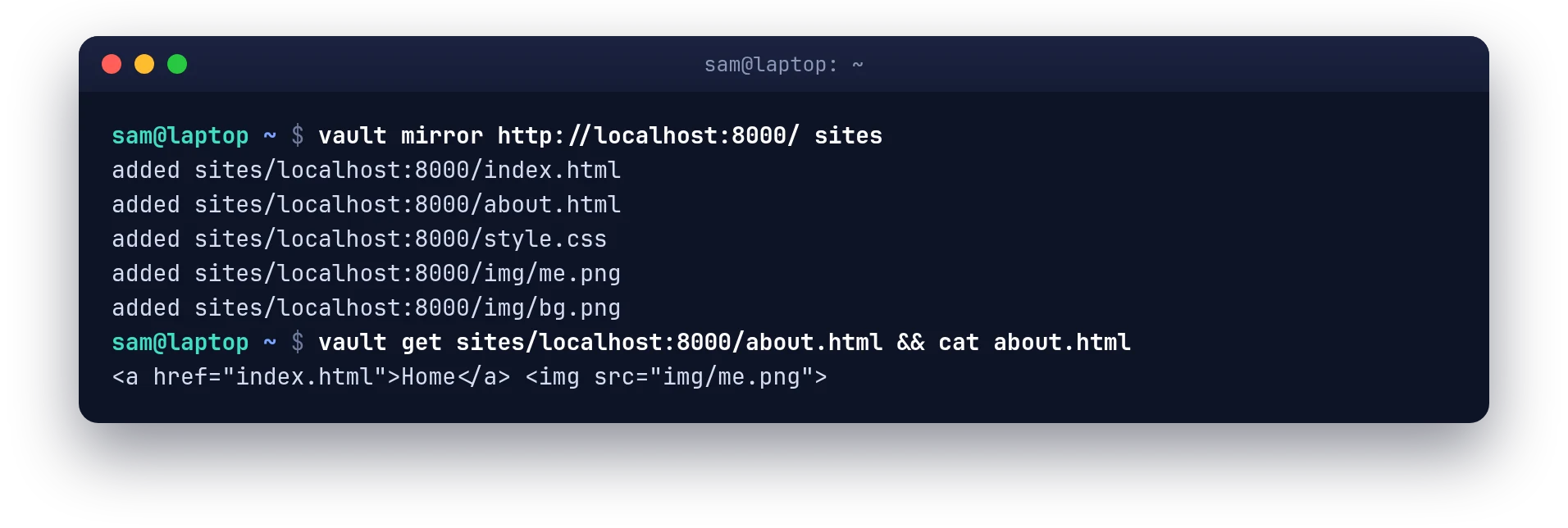
Pages that fail are reported and skipped; the crawl carries on. Links built by scripts and srcset lists aren't followed, and there's no depth limit or robots.txt handling, so only mirror sites you may copy.
From a tar archive: absorb
absorb reads a tar archive, gzipped or not, from standard input and stores every plain file in it, optionally under a folder, keeping the paths, permissions and dates recorded in the archive:
tar -cz photos | vault absorb backup                  # backup/photos/...
vault absorb backup < photos.tar.gz                   # an archive you already have
ssh server 'tar -C /etc -c .' | vault absorb server1/etc
gpg --decrypt cpt.tar.gpg | vault absorb cryptdrive   # straight out of another tool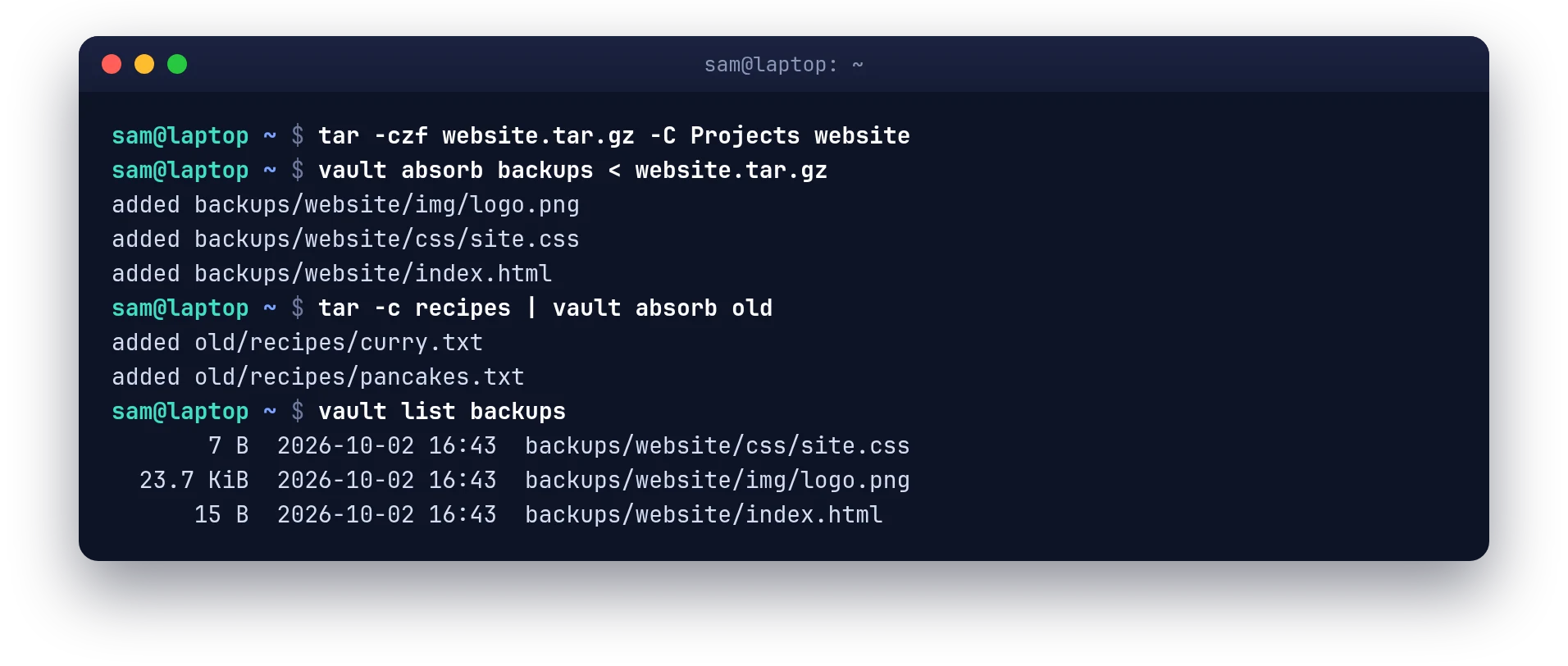
Each file is encrypted straight from the stream, so nothing is unpacked to disk first: the way to move a tarball, or another tool's encrypted archive, into vault without plaintext ever touching the drive. Directories need no entry of their own; links, devices and any name that tries to climb out with .. are skipped with a note. If the archive stops halfway through a file, that file isn't stored and vault stops with an error; everything before it is already safely in.
vault asks for its passphrase only once the archive starts arriving. So when it comes out of something that asks first, such as gpg, you answer gpg, then vault's prompt appears on a clean line. An empty pipe fails without asking at all. In a script, add set -o pipefail so a failure upstream isn't hidden behind vault's success.
Moving in: migrate
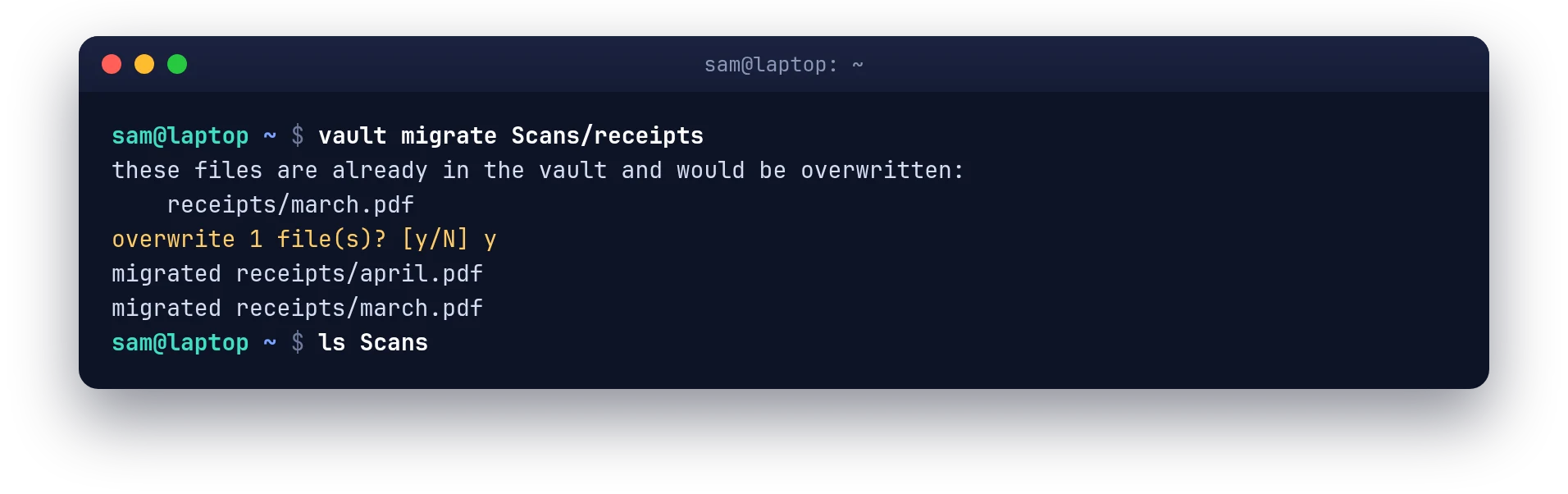
migrate works exactly like add but deletes each original once it's safely stored, then tidies away any folders left empty. It won't take a URL: there's no original to delete. Because the originals go, it checks first: if anything would replace a file already in the vault, it lists those names and asks before touching anything. Anything but y changes nothing, no terminal means no, and --yes answers yes up front for scripts.
08The decoy passphrase
One key, two passphrases, two worlds
Sometimes "I won't tell you my passphrase" isn't an option: a border crossing, a pushy partner, someone standing over you. The decoy is for that moment. You type it, the vault opens, and it's full of genuinely private-looking things. Everything behaves normally. It just isn't your real stuff.
Same key file, same folder. Pick a passphrase:
Every square is an encrypted entry on disk. Each passphrase lights up only its own; to it, everything else looks like filler.
sam@laptop ~ $ vault list
   1.1 MiB  2026-10-02 16:42  id/passport-scan.jpg
      21 B  2026-10-02 16:43  ideas/notes.md
      15 B  2026-10-02 16:42  letters/landlord.txt
 179.1 KiB  2026-10-02 16:42  tax-return-2025.pdf
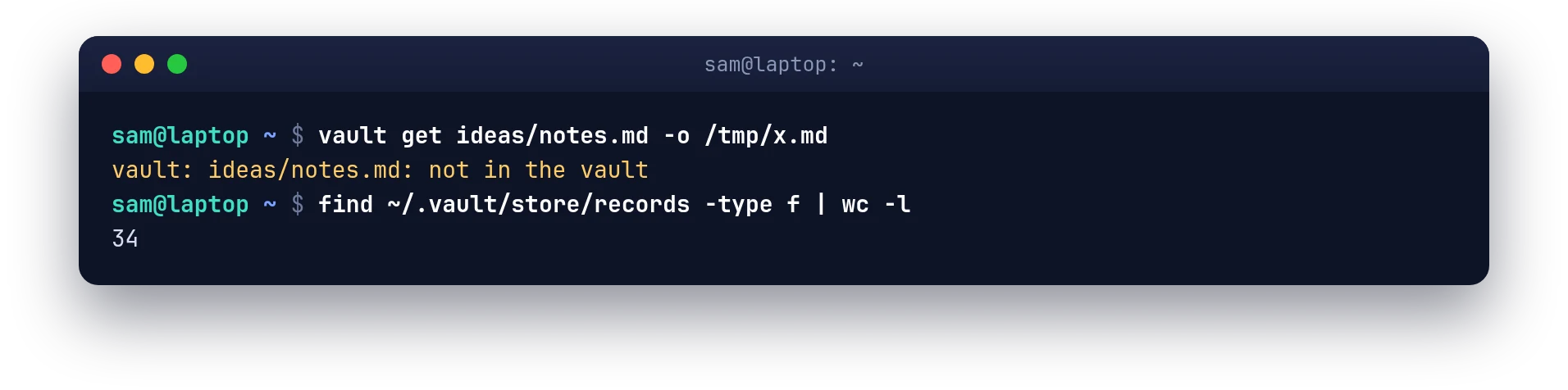
Nothing on the decoy side hints that the real side exists. Ask the decoy for a real file and you get the same message as a typo, and the entry count on disk doesn't give it away either, because filler is always there:
Setting up a decoy
- Run
vault genkeyand type your real passphrase, twice. - At Enter decoy passphrase (empty for none), type the decoy, twice. The two must differ.
- Run
vault init --filler 5G, with at least as much filler as you plan to hide. - Add some decoy files, typing the decoy passphrase.
- Add your real files, typing the real passphrase.
In scripts, set VAULT_DECOY_PASSPHRASE alongside VAULT_PASSPHRASE before genkey. Already have a key without a decoy? Make a new key with a different --key, make a new vault, get everything out of the old one and add it to the new. The key format deliberately can't say whether a decoy slot is in use, so there's nothing to upgrade.
Why it holds up
- The key file can't tell. Two slots of identical size in random order. With no decoy one is random noise, indistinguishable from an encrypted slot. Both are tried every time, so even the timing matches.
- The vault can't tell. Real and decoy entries are sealed to different keys but are the same size and shape, all dated 1970. Nothing on disk says which key an entry belongs to.
- The filler covers for you. Every vault has entries nobody can open, so "some entries I can't open" is true of every vault.
- The errors are identical. A real file asked for with the decoy passphrase gets exactly the same "not in the vault" as a typo.
Making it believable
- Fill it with plausibly private things: bank letters, payslips, notes, scans. What someone would encrypt. Two files called
test.txtis a neon sign. - Keep it at least as big as your real collection.
- Keep it alive. Add to it now and then, so the dates look like a real person uses it.
- Know it cold. Hesitating over the "real" passphrase is a tell.
- Never mention it, not in notes, a README, or a script on the same machine.
The honest limits
Numbers can give you away. Someone holding the decoy can count the entries they can't open. Without --filler there are only a few tens of megabytes of filler, so 400 records, or the 72 pieces of a 300 MB video, is more than filler can explain. They can't see what it is, only that there's more.
Growth over time is visible. Copy the folder today and again next month, and you can see that something was added, though not what.
It won't help if someone saw you type the real passphrase or has malware on your machine. It hides; it doesn't stop anyone deleting the raw files. And it isn't legal advice: some places treat misleading an official as an offence in its own right.
09Scripts and automation
Set the environment, and vault never asks
| Variable | What it does |
|---|---|
VAULT_PASSPHRASE | The passphrase, skipping the prompt. With genkey, the new key's passphrase. |
VAULT_DECOY_PASSPHRASE | genkey only: the decoy. If VAULT_PASSPHRASE is set and this isn't, no decoy is made. |
VAULT_KEY | The key file. Default ~/.vault/key. Same as --key. |
VAULT_DIR | The vault folder. Default ~/.vault/store. Same as --vault. |
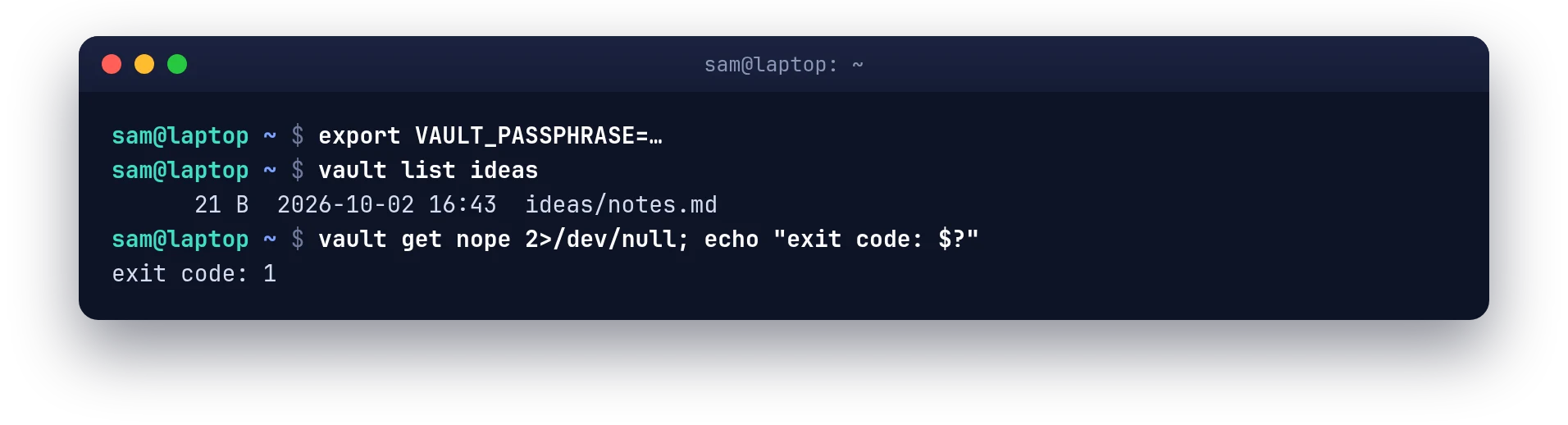
Don't type a passphrase into a command line; it lands in your shell history. Read it without echo: read -rs VAULT_PASSPHRASE && export VAULT_PASSPHRASE. Other programs running as you can read your environment, so for everyday use just let vault prompt.
Exit codes and output
0 means it worked, 1 means something went wrong (the reason is on standard error, starting vault:), and 2 means you ran vault with no command. list and help write to standard output; progress lines like added … and every error go to standard error, so vault list > files.txt gives a clean list. The list columns are fixed-width, which is why cut -c31- works even for names with spaces.
Recipes
Nightly: stash a folder. Re-adding replaces each file, so the vault always holds the latest copy.
#!/bin/sh
# ~/bin/stash-documents: re-adds everything in ~/Documents/private
export VAULT_PASSPHRASE="$(cat ~/.config/vault-pass)"   # chmod 600 this file!
vault add ~/Documents/private archive || exit 1

# crontab: 0 2 * * * $HOME/bin/stash-documents
A passphrase in a file trades safety for convenience: anyone who can read it and the key can open the vault. Only on a machine you trust completely, and never for the decoy.
Back up a server without plaintext touching your disk:
ssh server 'tar -C /srv/app -cz .' | vault absorb "servers/app/$(date +%F)"Get everything back out, keeping its folders:
#!/bin/sh
vault list | cut -c31- | while IFS= read -r name; do
  mkdir -p "restore/$(dirname "$name")"
  vault get "$name" -o "restore/$name"
done
PowerShell on Windows:
$env:VAULT_DIR = "D:\vault"
vault add .\report.docx
vault list10Locking, syncing and backups
Two terminals, two machines, and keeping copies
vault locks itself. Commands that change the vault (add, migrate, mirror, absorb, mv, rm) take an exclusive lock; commands that only read (list, get) share one. A command that has to wait says so and carries on by itself. The lock is taken after you've typed your passphrase, so someone slow at typing never blocks you.

If vault crashes holding the lock, the operating system drops it on Linux, macOS, the BSDs and Windows. On Plan 9 and WebAssembly, which have no file locks, vault uses a lock file instead and tells you after a minute exactly which file to delete if one is left behind.
Syncing between machines
A vault is just a folder, so Syncthing, Dropbox, iCloud Drive, OneDrive, rsync or a USB stick will carry it. Copy the key to each machine over something private.
Locks don't travel through sync services. One machine writes at a time, and let the sync finish before writing on the other.
Slips are rarely a disaster: "conflicted copy" files have names vault ignores, and if both machines added the same name, list shows the newest and the next add or rm of it tidies up. NFS honours vault's locks on Linux and the BSDs, and Windows shares honour them from Windows.
Backups
Back up the vault folder and the key file, ideally in different places.
vault never edits a file in place: every entry is written once and later deleted, never changed. So incremental backups (rsync, restic, borg, Time Machine) are fast and tidy; each run only copies what's new.
rsync -a --delete ~/.vault/store/ /media/backup/vault-store/
vault list --vault /media/backup/vault-store # test that the backup opens11Under the hood
The cryptography, the layout, and what a thief learns
Each file gets its own random 256-bit key, wrapped with a hybrid of FrodoKEM and ML-KEM, and is encrypted in authenticated 64 KiB chunks.
| Job | How |
|---|---|
| Protecting your key | Argon2id (3 passes, 64 MiB, 4 lanes) turns the passphrase into a key that seals your identity with XChaCha20-Poly1305. |
| Your identity | A 32-byte seed from which the FrodoKEM-640 and ML-KEM-768 key pairs are derived. |
| Per-file key | 256 random bits, fresh for every entry. |
| Wrapping that key | FrodoKEM-640 and ML-KEM-768 encapsulations, combined with HKDF-SHA-256 into one key-encryption key, then ChaCha20-Poly1305. |
| Header integrity | HMAC-SHA-256 under the per-file key. |
| The contents | ChaCha20-Poly1305 in a STREAM construction: 64 KiB chunks, each authenticated, the last one marked so truncation is caught. |
Why two post-quantum algorithms? ML-KEM is the new standard, efficient and heavily analysed. FrodoKEM is slower and bulkier but rests on older, more conservative maths. Combined, a breakthrough against either alone isn't enough.
What's in the folder
~/.vault/store/
├── .vault             marker: "VAULT 2"
├── .lock              lock file, always empty
├── records/0f/
│   └── 0f1170a6…      one encrypted catalogue entry per file, every one 18,704 bytes
└── objects/3e/
    └── 3e78275e…      contents in 4 MiB pieces: 64 KiB, 128 KiB … 4 MiB, never in between
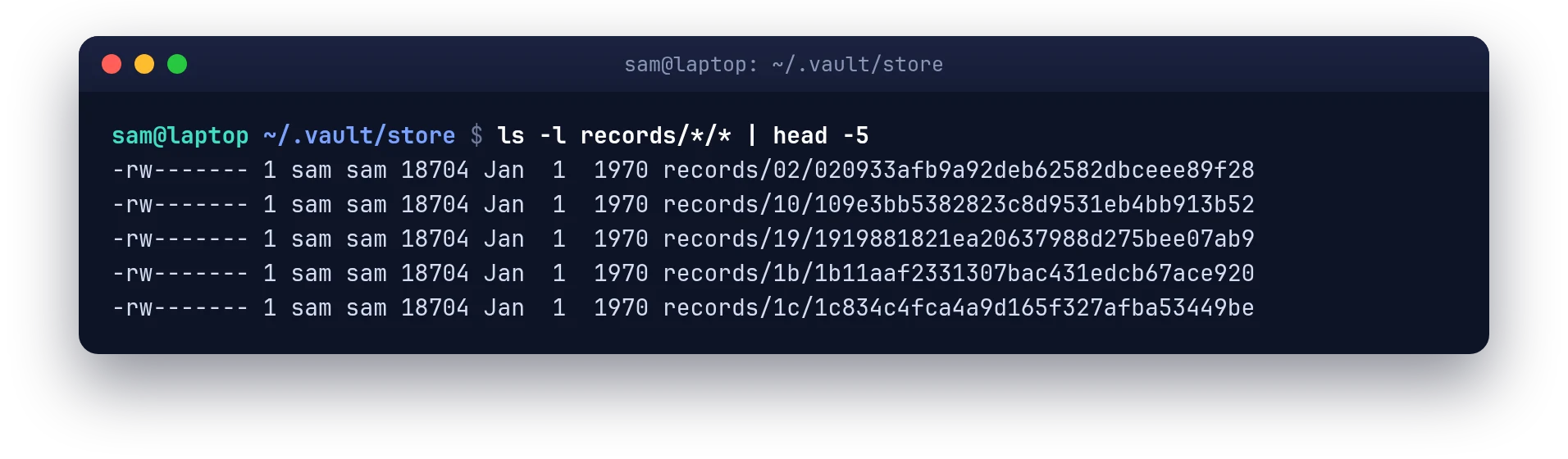
A record holds one file's name, size, permissions, dates and a secret random seed, padded to 4096 bytes before encryption so every record is the same size whatever the name. The contents are cut into objects of just under 4 MiB. Every object starts with its own ID, the last is padded with random bytes up to the next power of two (at least 64 KiB), and each is encrypted separately. Object names are derived from the seed, so only someone who can open the record can tell which objects belong together, or in what order.
Why big files are cut up
As one object, a 300 MB video would be a single 512 MiB blob: obviously one large file, and too big to be filler. Cut up, it's 72 objects exactly the same size as the largest filler and every other big file's pieces, and nothing says which belong together. Small files and last pieces are still bucketed to a power of two, so nothing wastes more than 4 MiB. Totals still show (objects × 4 MiB is a fair estimate of what you store), and someone watching the folder change can see 72 objects appear together. The pieces hide a file's size from a snapshot, not from someone watching you add it.
What an attacker learns
Someone with a copy of your vault folder…
Can't
- Read any file's contents
- Learn file or folder names
- Learn exact file sizes
- Learn when a file was created or changed
- Tell real entries from decoy or filler
- Alter a file without it being detected
- Swap one file's contents for another's
- Tell which pieces make up one file, from a single copy
Can
- Count entries and see roughly how much you store
- See that the folder changed between two copies
- Delete entries
- Put back an older copy of an entry (roll back)
Deletion and rollback aren't detectable. vault can prove a file is exactly what you stored, but not that it's the latest thing you stored. If the storage isn't under your control, keep an independent backup.
What happens during add
- Pick a random seed. Read the file 4 MiB at a time, encrypting each piece (the last with random padding) to a hidden temporary file, several at once.
- Give each piece the name the seed dictates. They're stored, but nothing refers to them yet.
- Encrypt a record holding the seed into
records/. - Only then delete any older version of the same name.
Interrupt it anywhere and the worst case is some orphaned encrypted objects that nothing points to. You never get a record pointing at nothing, or lose both versions. vault's crypto core comes from Fury, my larger post-quantum encryption toolkit, which is why every entry's first line still reads fury-encryption.org/v1: changing a well-tested format for looks is how bugs get in.
12When things go sideways
Every message, and what to do about it
Almost every error is a wrong passphrase, the wrong --key or --vault, a typo in a name, or a file already in the way. Your data is still fine.
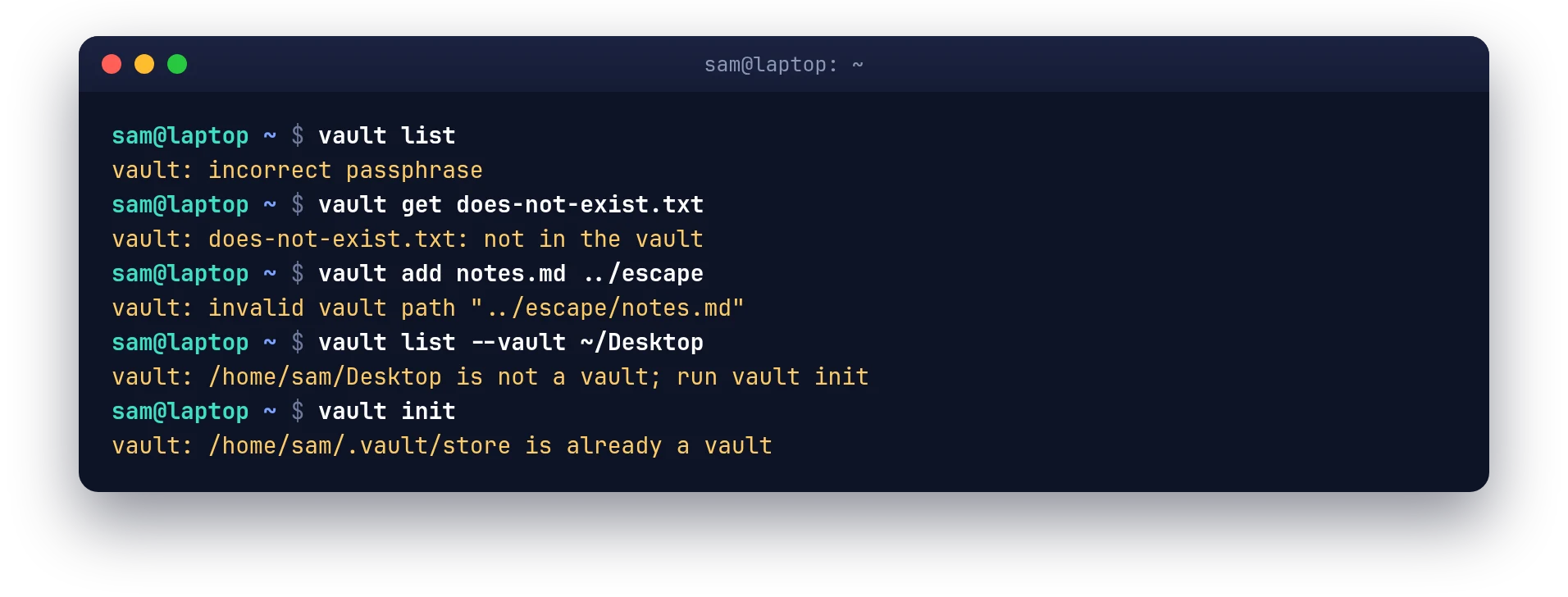
| Message | What it means, and the fix |
|---|---|
incorrect passphrase | Typo, Caps Lock, or the wrong key file. Check --key and VAULT_KEY. |
not a vault key file | --key points at something else, or the key is damaged. Use your backup. |
open …/key: no such file or directory | No key there yet. Run vault genkey, or point VAULT_KEY at yours. |
… is not a vault; run vault init | Wrong --vault or VAULT_DIR, or no init yet. |
… is already a vault | init on an existing vault. Nothing was changed. |
NAME: not in the vault | Check the exact name with vault list; it's case-sensitive and includes the folder. Or you typed the other passphrase. |
… already exists | get: the output exists, use -o. mv: the new name is taken. genkey: you already have a key. |
invalid vault path "…" | Names can't start with / or ../, end in /, or contain backslashes or control characters. |
…: not a regular file of at most 1 TiB | A device, a socket or a gigantic file. |
… changed while being added | The file was being written as vault read it. Try again once it's finished. |
skipping …: not a regular file | A symlink or special file was skipped. Everything else went in. |
skipping …: unsafe name | absorb: a tar entry tried to climb out with ... Skipped. |
…: archive ends early | absorb: the stream stopped mid-file. That file wasn't stored; earlier ones were. |
no files in archive | absorb: nothing but directories and links. |
nothing to absorb on standard input | absorb: the pipe closed without sending anything. Check the command feeding it. |
absorb reads a tar archive from standard input | Nothing was piped in. Use vault absorb < file.tar or a pipe. |
refusing to remove the whole vault | rm -r /, or an empty folder name. Name the folder you mean. |
rm cancelled; nothing changed | You didn't answer y to rm -r, or there was no terminal to ask on. -f skips the question. |
migrate cancelled; nothing changed | You answered no (or there was no terminal). Use --yes in scripts. |
passphrases do not match | The two entries differed. Nothing was created. |
decoy passphrase must differ from the passphrase | Pick a different decoy. |
could not read passphrase (set VAULT_PASSPHRASE…) | No terminal to ask on, typically cron or CI. Set the variable. |
waiting for another vault process to finish | Not an error. It continues when the other command is done. |
skipping unreadable record … | A catalogue entry is damaged. Everything else works; restore records/ from backup. |
object does not match its catalogue record | Contents swapped or damaged, caught before any output appeared. Restore objects/ from backup. |
"My files have vanished!"
Nine times out of ten: you typed the other passphrase (decoy and real are separate worlds), you're looking at a different vault (check --vault and VAULT_DIR), or you're looking in a folder (vault list letters only shows letters/).
Interrupted?
Power cut, closed lid, Ctrl+C: it's fine. vault writes new data first and removes old data last, so the vault stays consistent. At worst there's an orphaned encrypted object or a temporary file starting .pending-, both harmless and safe to delete.
The one thing that can't be fixed is a lost key file or a forgotten passphrase. Back up your key.
13Cheat sheet
The whole tool at a glance
vault genkeyMake a key. Asks for a passphrase and an optional decoy.vault init [--filler SIZE]Make an empty vault, with filler.vault add FILE|DIR|URL [FOLDER]Encrypt in, keeping the name. Replaces an existing name.vault migrate FILE|DIR [FOLDER] [--yes]Like add, then delete the originals. Asks before replacing.vault mirror URL [FOLDER]Crawl a website in, links rewritten to work offline.vault absorb [FOLDER] < TAREvery file in a tar or .tar.gz from standard input.vault ls [FOLDER]One folder: sub-folders (ending in /) with their totals, then files. -r for everything.vault list [FOLDER]Every file under it, full names. Pipes cleanly.vault get NAME [-o OUT]Decrypt out. Never overwrites. Verifies first.vault mv OLD NEWRename, using the full new name. Instant. Alias rename.vault rm [-r] [-f] NAMEDelete a file, or a folder with -r (asks first unless -f). Frees the space. No undo.--key PATH · VAULT_KEYKey file, default ~/.vault/key.--vault DIR · VAULT_DIRVault folder, default ~/.vault/store.Numbers worth knowing
Largest file 1 TiB. Longest stored name 1024 bytes. Objects on disk between 64 KiB and 4 MiB. 256 folders each under records/ and objects/. 8 to 32 filler entries in a new vault, or more with --filler. Key file 319 bytes. Exit codes: 0 ok, 1 error, 2 no command.
14FAQ
Questions people ask
Is vault post-quantum?
Yes. Every file gets its own random 256-bit key, wrapped with both FrodoKEM-640 and ML-KEM-768 and combined with HKDF-SHA-256, so an attacker has to break both post-quantum algorithms.
What can someone with a copy of my vault folder see?
Roughly how much you store, and that the folder changed between two copies. They can't read contents, names, exact sizes or dates, can't tell real entries from decoy or filler, and can't alter a file without detection. They can delete entries or roll them back, so keep a backup.
How does the decoy passphrase work?
A key can have two passphrases. Each opens a separate set of files in the same vault folder. The key file always has two equal slots in random order and every vault holds unopenable filler, so nothing shows whether a second set exists.
What happens if I forget my passphrase or lose my key file?
The files can't be recovered by anyone. vault has no reset, master key or back door, so back up the key file and remember the passphrase.
Can I pipe a tar archive into vault?
Yes. vault absorb reads a tar or .tar.gz from standard input and encrypts each file straight from the stream, for example tar -cz photos | vault absorb backup, or gpg --decrypt archive.tar.gpg | vault absorb secrets.
Every screenshot on this page is real output from the vault binary, run in a throwaway home folder shown as /home/sam. A few lines are highlighted in amber to make them easier to spot.
That's it.
Go encrypt something. (And back up your key.)