7. Communications and messaging
The short version
- Every message carries metadata: who, when, from where. Encryption hides the words, not the pattern.
- Your phone is the weak link, not the maths. Passcode, lock-screen previews and cloud backups matter more than the app's cipher.
- Match the channel to the topic. One easy default for normal chat, one clearly agreed channel for sensitive stuff.
- Phone numbers are a single point of failure. A SIM-swap can take your messages and your accounts in one go.
- Accept some risk on purpose. Everyday chat can stay simple; save the extra steps for moments that justify them.
Messaging is where risk escalates fastest, because it feels so ordinary. A text to a partner, a voice note to a colleague, a photo to a friend: all routine, all recorded somewhere, and each leaves traces that can combine in unexpected ways.
This is not a choice between secrecy and openness. It is about how much you are prepared to leak by default, and how much friction you can live with to reduce it.
What actually travels when you send a message
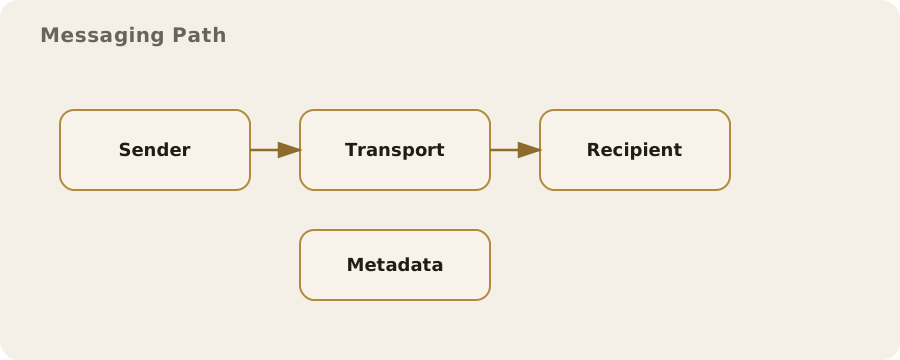
You think of a message as its content. But every message also carries metadata:
- who contacted whom;
- when;
- from which device and which network;
- often, location signals too.
Even when the content is protected, the metadata usually stays visible to the service provider and sometimes to network operators. That is often enough to map relationships, routines and patterns of life.
Two mundane examples:
- A community organiser sends a reminder to the same list at 18:00 every Thursday. Harmless content, but the pattern reveals a regular group and the organiser's role.
- A manager's late-night messages to one particular member of staff can signal a sensitive project, even if the text is banal.
These are not edge cases. They are the everyday result of systems built for convenience, not minimal exposure.
Encryption, and what it does and does not solve
Encryption turns readable text into something only a recipient with the right key can decode. "End-to-end encryption" means it is encrypted on your device and decrypted only on the recipient's, not on the service's servers.
It protects content from the provider and from many forms of interception. It does not hide who you are talking to, when, or how often.
Myth: "encrypted means anonymous". Reality: it doesn't.
Myth: encryption guarantees safety. Reality: the devices at each end are still points of failure. If someone has access to a device (a shared tablet, a work phone that gets routinely checked, a laptop with spyware), encrypting the transport is irrelevant.
In the UK, several mainstream messaging services offer end-to-end encryption by default. Good baseline, not the end of the story:
- providers can still collect metadata and can be compelled to hand it over;
- they can be required to build lawful intercept capabilities in ways that affect privacy.
You do not need to become a legal expert. Just know that the law treats message content and metadata differently.
Choosing a channel: convenience, coverage, and control
Each channel is a trade-off:
- SMS: nearly universal, treated as "just a text", but unencrypted and exposed to interception and SIM-swap attacks.
- Standard email: often readable in transit and at rest, unless both ends add their own encryption.
- Popular messaging apps: many encrypt content but store backups in ways that strip those protections away.
Picture a parent texting details of a child's medical appointment because SMS is quick and everyone has it. The risk is not just interception. SMS rides on phone numbers that banks and services use as identity markers. If the number is taken over, old messages and authentication codes can be exposed at the same time. An end-to-end encrypted app with a local, device-only backup cuts that risk without anyone learning a complex workflow.
For groups, convenience wins. If the secure option is too hard to install, people drift back to the easy one and the group becomes brittle. So match the channel to the sensitivity of the topic rather than chasing the "most secure" option every time: a default for normal chat, plus a separate, clearly understood channel for higher-risk matters.
Device security: the weak link by default
Most real-world failures come from devices, not cryptography. A weak passcode, a laptop shared with the family, or a work device under routine monitoring can undo every other safeguard.
If your phone lights up with a message preview, a casual glance on the bus can reveal more than you meant to share. Unlocked at the wrong moment, lock-screen notifications expose content to anyone nearby.
Simple fixes beat exotic ones:
- Use a long passcode, not a four-digit PIN.
- Turn off lock-screen previews for sensitive apps.
- Keep work and personal accounts separate where you can. Mixing them creates legal and organisational risk, such as a work device being seized or inspected while holding personal correspondence.
Then check your backups. Many messaging apps offer cloud backups that are not end-to-end encrypted by default. Your messages may be protected in transit but readable in storage by the provider, or by anyone who gets into your cloud account. If you use cloud backups, make it a conscious trade-off, not an invisible default.
Contact lists and social graphs
New app, first question: "Allow access to contacts?" That is a bigger privacy decision than it looks. Uploading your address book tells the service who you know, shares other people's details without their consent, and can leak relationships you never meant to reveal.
Real scenario: a therapist installs a new messaging app for clients and grants full contact access. The service now holds vulnerable individuals, professional peers and personal contacts, all tied together. The messages may be encrypted; the contact graph is not.
Safer: deny address book access and add contacts by hand when needed. Slower, but it respects other people's privacy and cuts what the service knows.
Groups, forwards, and the risk of drift
Group chats feel ephemeral. They are not. Messages can be saved, forwarded, or quoted out of context, and any member can screenshot or export, even in an end-to-end encrypted group. The technical protection stops at the group boundary; inside it, social dynamics take over.
Risk often grows through drift: the slow widening of who is in the group or how its content is used. A neighbourhood watch chat starts with a handful of residents, then gains local officials or private security. The same jokes land very differently with a bigger, less familiar audience.
Treat membership as a real boundary:
- keep groups small for sensitive topics;
- give them explicit names that reflect their purpose;
- review who is in them every so often.
Voice and video calls
Calls feel more private, but the same rules apply. End-to-end encryption can protect what is said, yet metadata and call logs are still recorded, and some services sync call logs across devices or into cloud accounts.
A call's existence can be as revealing as its content, especially when the pattern shows who you ring in a crisis or a negotiation.
Then there is what the microphone and camera pick up. Background noise can give away a workplace, a child's school or a public place. Video can show documents, screens or household details behind you. Easy habits:
- use headphones;
- check what is visible behind you;
- avoid speakerphone when others are around.
Disappearing messages and their limits
Disappearing messages reduce long-term exposure. They are not a guarantee. The recipient can screenshot, photograph or otherwise record the content, and some apps tell you about screenshots while others do not. Think of the feature as protection against later discovery, not against the person you are messaging.
Example: a journalist shares a sensitive source detail with a colleague using disappearing messages. That lowers the chance a later device seizure reveals the text. It does nothing to stop the colleague screenshotting it or copying it elsewhere.
The fix here is procedural: agree how the information will be handled, and whether it should be written down at all.
When you should worry about telecommunications data
In the UK, telecommunications data (who contacted whom, and when) can be accessed under legal powers that are broader than those for content. Most people will never be directly affected, but those powers shape the privacy environment. Sensible assumption: if a message matters, its metadata might matter too.
That is not a call for constant suspicion. It is about context:
- A community group arranging a picnic: mainstream tools are probably a reasonable trade-off.
- A whistleblower contacting a journalist: metadata exposure is a serious factor in choosing tools, and in the timing and location of contact.
Identity, accounts, and phone numbers
Phone numbers get treated as identities: for account recovery, contact discovery and multi-factor authentication. Handy, but it makes them a single point of failure. If a number is reassigned or hijacked through a SIM-swap, a whole chain of accounts can fall. This is not rare; it happens to ordinary people as well as public figures.
The fixes are straightforward:
- set a PIN on your mobile carrier account;
- avoid SMS for account recovery where you can;
- use app-based authentication instead;
- for messaging, prefer services that allow usernames instead of phone numbers, or let you hide your number.
Each one makes it harder to link your communications to your wider digital identity.
Bridging work and personal life
Work chat tools often come with monitoring, compliance or retention policies. Messages on work platforms can be kept for years and audited. A message from your personal account to a work account can end up in systems you do not control. That is not about wrongdoing; it is how organisations manage risk.
In practice: a sensitive personal update sent to a colleague over company chat feels private, but it can be archived and pulled up later in a routine compliance review.
Simple rule: personal on personal platforms, work on work systems. If you need to discuss something sensitive with colleagues, agree a channel that respects both individual privacy and the organisation's obligations.
Operational habits that make a real difference
Small behaviour changes cut exposure without turning daily life into a technical project. A few that hold up in practice:
- Keep a small set of trusted, well-understood apps rather than juggling multiple services with overlapping functions.
- Turn on automatic updates so messaging apps and devices receive security fixes promptly.
- Use a separate device or profile for high-sensitivity communications if your normal device is frequently shared or monitored.
- Agree with regular contacts on which topics belong in which channels.
None of these guarantees safety, and none needs taking to extremes. The aim is to remove the easy risks (the ones born of defaults, convenience and assumptions) while accepting that some exposure is the price of normal communication.
Knowing when to accept risk
Every mitigation costs something: complexity, time, social friction or plain inconvenience. There is no single right level of protection.
For many people, the sensible approach is simple everyday messaging, with extra steps saved for moments that justify them. For others, such as people in sensitive roles or under closer scrutiny, a higher baseline may fit.
What matters is clarity. If you know what a tool protects and what it does not, you can decide without anxiety. Communication systems are not neutral; they embody trade-offs. Give them the same care you give to where you keep your keys or how you lock your front door, and you will live more comfortably with both the limits and the protections.
Do this now
- Turn off lock-screen message previews for your most sensitive messaging app.
- Check whether your messaging app's cloud backup is end-to-end encrypted. If not, switch it on or decide deliberately to live without it.
- Ring your mobile provider (or use its app) and set an account PIN to make SIM-swaps harder.